
Ford Fusion: Powertrain
Ford Fusion 2013–2020 Service Manual / Powertrain
- Engine
- Engine System - General Information
- Engine - 1.5L EcoBoost (118kW/160PS) – I4
- Engine - 1.5L EcoBoost (118kW/160PS) – I4
- Engine Cooling - 1.5L EcoBoost (118kW/160PS) – I4
- Fuel Charging and Controls - 1.5L EcoBoost (118kW/160PS) – I4
- Fuel Charging and Controls - Turbocharger - 1.5L EcoBoost (118kW/160PS) – I4
- Accessory Drive - 1.5L EcoBoost (118kW/160PS) – I4
- Starting System - 1.5L EcoBoost (118kW/160PS) – I4
- Engine Ignition - 1.5L EcoBoost (118kW/160PS) – I4
- Engine Emission Control - 1.5L EcoBoost (118kW/160PS) – I4
- Intake Air Distribution and Filtering - 1.5L EcoBoost (118kW/160PS) – I4
- Evaporative Emissions - 1.5L EcoBoost (118kW/160PS) – I4
- Electronic Engine Controls - 1.5L EcoBoost (118kW/160PS) – I4
- Electronic Engine Controls - 1.5L EcoBoost (118kW/160PS) – I4
- Automatic Transmission
- Automatic Transmission - 6-Speed Automatic Transmission – 6F35
- Transmission Cooling - 6-Speed Automatic Transmission – 6F35
- Automatic Transmission External Controls - 6-Speed Automatic Transmission – 6F35
- Four-Wheel Drive Systems
- Exhaust System
- Fuel System - General Information
 Heated Steering Wheel Module (HSWM). Removal and Installation
Removal
NOTE:
Removal steps in this procedure may contain installation details.
NOTE:
This step is only necessary when installing a new component...
 Engine
..
Other information:
Ford Fusion 2013–2020 Owners Manual: Garage Door Opener
HomeLink Wireless Control System WARNING: Do not use the system with any garage door opener that does not have the safety stop and reverse feature as required by U.S. Federal Safety Standards (this includes any garage door opener manufactured before April 1, 1982). A garage door opener which cannot detect an object, signaling the door to stop and reverse, does not meet current federal saf..
Ford Fusion 2013–2020 Service Manual: C-Pillar Side Impact Sensor. Removal and Installation
Removal NOTE: Removal steps in this procedure may contain installation details. WARNING: Turn the ignition OFF and wait one minute to deplete the backup power supply. Ignition must remain OFF until repair is complete. Failure to follow this instruction may result in serious personal injury or death in the event of an accidental deployment. If installing a new component ..
Categories
- Manuals Home
- 2nd Generation Ford Fusion Owners Manual
- 2nd Generation Ford Fusion Service Manual
- Main Control Valve Body. Removal and Installation
- Load Carrying
- Engine - 1.5L EcoBoost (118kW/160PS) – I4
- New on site
- Most important about car
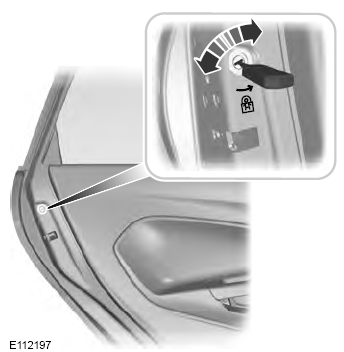
Child Safety Locks
When these locks are set, the rear doors cannot be opened from the inside.

Copyright © 2026 www.fofusion2.com