
Ford Fusion: Powertrain / Automatic Transmission
Ford Fusion 2013–2020 Service Manual / Powertrain / Automatic Transmission
- Automatic Transmission - 6-Speed Automatic Transmission – 6F35
- Transmission Cooling - 6-Speed Automatic Transmission – 6F35
- Automatic Transmission External Controls - 6-Speed Automatic Transmission – 6F35
 Variable Camshaft Timing (VCT) Oil Control Solenoid. Removal and Installation
Removal
NOTE:
Removal steps in this procedure may contain installation details.
Remove the engine appearance cover.
Disconnect the electrical connectors, remove the bolts and the VCT oil control solenoids...

Other information:
Ford Fusion 2013–2020 Owners Manual: Seatbelt Height Adjustment. Seatbelt Warning Lamp and Indicator Chime
Seatbelt Height Adjustment WARNING: Position the seatbelt height adjuster so that the seatbelt rests across the middle of your shoulder. Failure to adjust the seatbelt correctly could reduce its effectiveness and increase the risk of injury in a crash. Pull the button and slide the height adjuster up or down. Release the button and pull down on the height adjuster to make sure it is ..
Ford Fusion 2013–2020 Service Manual: Hydraulic Control Unit (HCU). Removal and Installation
Removal NOTE: Removal steps in this procedure may contain installation details. NOTE: The HCU and ABS module are released individually. A new HCU does not come equipped with an ABS module. All vehicles Remove the battery tray. Refer to: Battery Tray (414-01 Battery, Mounting and Cables, Removal and Installation). Vehicles with manual transmission D..
Categories
- Manuals Home
- 2nd Generation Ford Fusion Owners Manual
- 2nd Generation Ford Fusion Service Manual
- Load Carrying
- Pre-Collision Assist (IF EQUIPPED)
- Starter Motor. Removal and Installation
- New on site
- Most important about car
Manual Climate Control
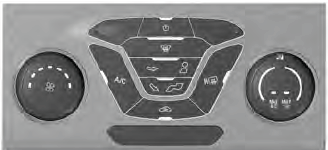
Note: Depending on your vehicle option package, the controls may look different from what you see here.

Copyright © 2026 www.fofusion2.com