
Ford Fusion: SYNC™ 3
Ford Fusion 2013–2020 Owners Manual / SYNC™ 3
- General Information
- Using Voice Recognition
- Entertainment
- AM/FM Radio
- SiriusXM® Satellite Radio (If Activated)
- HD Radio™ Information (If Available)
- CD (If equipped)
- Bluetooth Stereo or USB
- USB Ports. Apps. Supported Media Players, Formats and Metadata Information
- Climate
- Phone
- Navigation
- Apps
- Settings
- SYNC™ 3 Troubleshooting
 SYNC™ Troubleshooting
Your SYNC system is easy to use. However,
should questions arise, see the tables
below.
Use your regional Ford website at any time
to check your phone's compatibility,
register your account and set preferences
as well as access a customer
representative via an online chat (during
certain hours)...
 General Information
WARNING: Driving while distracted
can result in loss of vehicle control, crash
and injury. We strongly recommend that
you use extreme caution when using any
device that may take your focus off the
road...
Other information:
Ford Fusion 2013–2020 Service Manual: Selector Lever Cable - 1.5L EcoBoost (118kW/160PS) – I4. Removal and Installation
Removal Turn the ignition switch to the OFF position and apply the parking brake. Remove the air cleaner. Refer to: Air Cleaner (303-12A Intake Air Distribution and Filtering - 1.5L EcoBoost (118kW/160PS) – I4, Removal and Installation)...
Ford Fusion 2013–2020 Service Manual: Perimeter Anti-Theft Alarm - System Operation and Component Description. Description and Operation
System Operation System Diagram Item Description 1 BCM 2 Turn Signals 3 Horn 4 Door Ajar Switches 5 Hood Ajar Switch 6 Luggage Compartment Lid Ajar Switch 7 Right Door Lock Control Switch 8 IPC 9 Courtesy Lamps 10 Passive Key 11 RTM 12 Ignition Switch 13 DDM 14 GWM 15 GWM 16 PDM ..
Categories
- Manuals Home
- 2nd Generation Ford Fusion Owners Manual
- 2nd Generation Ford Fusion Service Manual
- Engine Cooling System Draining, Vacuum Filling and Bleeding. General Procedures
- Body Control Module (BCM). Removal and Installation
- Electronic Parking Brake (EPB) Service Mode Activation and Deactivation. General Procedures
- New on site
- Most important about car
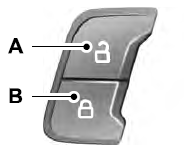
Power Door Locks
The power door lock control is on the driver and front passenger door panels.

Copyright © 2026 www.fofusion2.com