
Ford Fusion: Information and Entertainment System - General Information - Vehicles With: SYNC 3 / Universal Serial Bus (USB) Hub. Removal and Installation
Ford Fusion 2013–2020 Service Manual / Electrical / Information and Entertainment Systems / Information and Entertainment System - General Information - Vehicles With: SYNC 3 / Universal Serial Bus (USB) Hub. Removal and Installation
Special Tool(s) / General Equipment
| Interior Trim Remover |
Removal
-
-
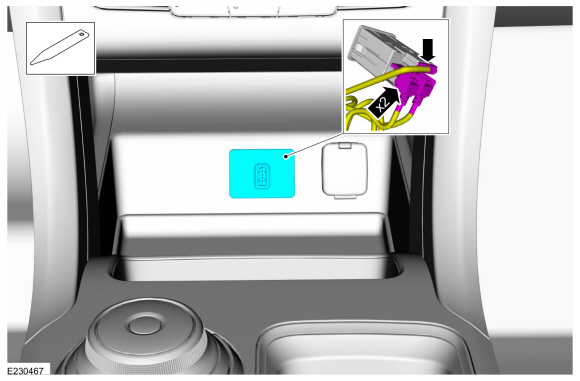
Remove the USB port bezel.
-
Disconnect the electrical connectors.
Use the General Equipment: Interior Trim Remover
-
Remove the USB port bezel.
 |
Installation
-
To install, reverse the removal procedure.
 Telematics Control Unit (TCU) Module Antenna. Removal and Installation
Removal
NOTE:
Removal steps in this procedure may contain installation details.
Remove the parcel shelf.
Refer to: Parcel Shelf (501-05 Interior Trim and Ornamentation, Removal and Installation)...
 Voice Microphone. Removal and Installation
Removal
NOTE:
Removal steps in this procedure may contain installation details.
WARNING:
Before beginning any service procedure in this
section, refer to Safety Warnings in section 100-00 General Information...
Other information:
Ford Fusion 2013–2020 Service Manual: Audio Front Control Module (ACM) - Police. Removal and Installation
Removal NOTE: Make sure that any media is ejected from unit. NOTE: Removal steps in this procedure may contain installation details. NOTE: If installing a new module, it is necessary to upload the module configuration information to the scan tool prior to removing the module...
Ford Fusion 2013–2020 Service Manual: Cylinder Head. Removal and Installation
Special Tool(s) / General Equipment 303-1097Locking Tool, Variable Camshaft Timing Oil Control UnitTKIT-2010B-FLMTKIT-2010B-ROW 303-1556Locking Tool, Timing BeltTKIT-2010B-FLMTKIT-2010B-ROW 303-748Locking Tool, CrankshaftTKIT-2010B-FLMTKIT-2010B-ROW Strap Wrench Oil Drain Equipment Hot Air Gun Hose Clamp Remover/Installer Materials Name Specificatio..
Categories
- Manuals Home
- 2nd Generation Ford Fusion Owners Manual
- 2nd Generation Ford Fusion Service Manual
- Memory Function
- Front Controls Interface Module (FCIM). Removal and Installation
- Engine - 1.5L EcoBoost (118kW/160PS) – I4
- New on site
- Most important about car
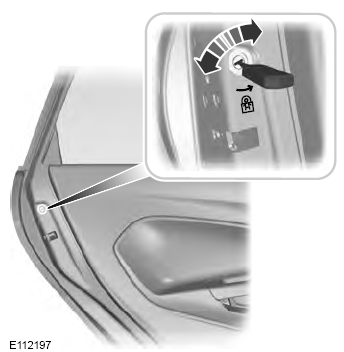
Child Safety Locks
When these locks are set, the rear doors cannot be opened from the inside.

Copyright © 2026 www.fofusion2.com