
Ford Fusion: Information and Entertainment System - General Information - Vehicles With: SYNC 3 / Front Controls Interface Module (FCIM). Removal and Installation
Ford Fusion 2013–2020 Service Manual / Electrical / Information and Entertainment Systems / Information and Entertainment System - General Information - Vehicles With: SYNC 3 / Front Controls Interface Module (FCIM). Removal and Installation
Special Tool(s) / General Equipment
| Interior Trim Remover |
Removal
NOTE: Removal steps in this procedure may contain installation details.
-
NOTE: If installing a new module, it is necessary to upload the module configuration information to the scan tool prior to removing the module. This information must be downloaded into the new module after installation.
Upload the FCIM configuration to the scan tool by following the scan tool on-screen instructions
-
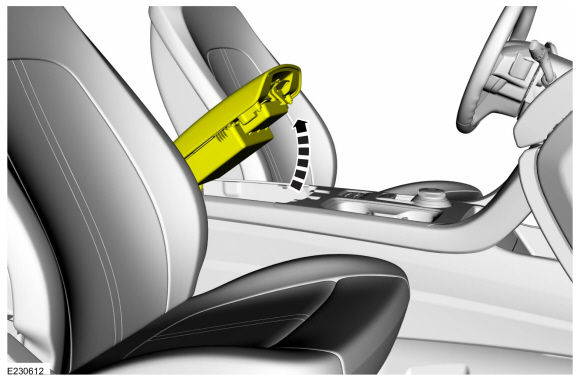
Open the floor console armrest.
 |
-
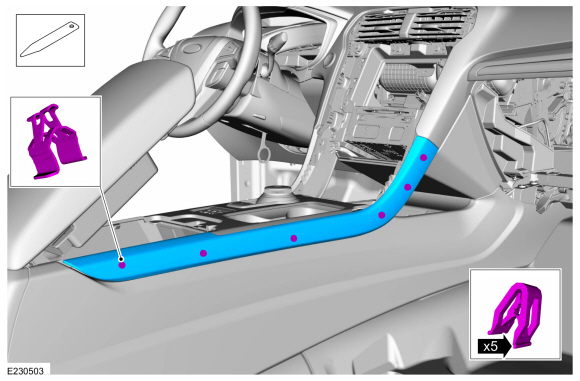
NOTE: RH side shown, LH side similar.
On both sides.
Release the clips and remove the floor console upper finish panel.
Use the General Equipment: Interior Trim Remover
 |
-
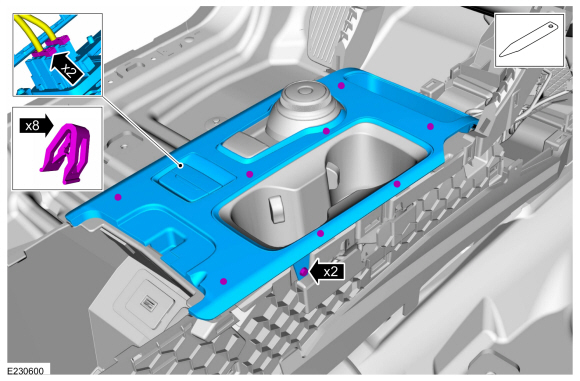
Release the clips, remove the screws and remove the the floor console upper trim panel.
-
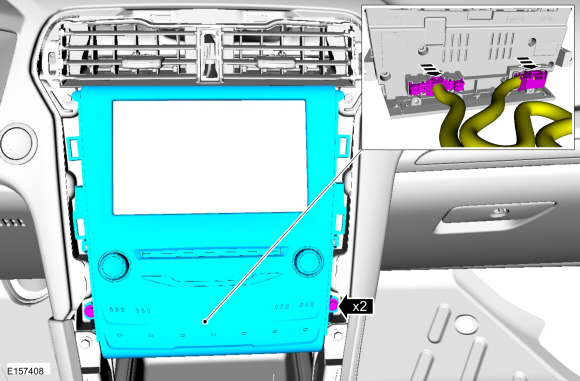
Disconnect the electrical connectors.
Use the General Equipment: Interior Trim Remover
-
Disconnect the electrical connectors.
 |
-
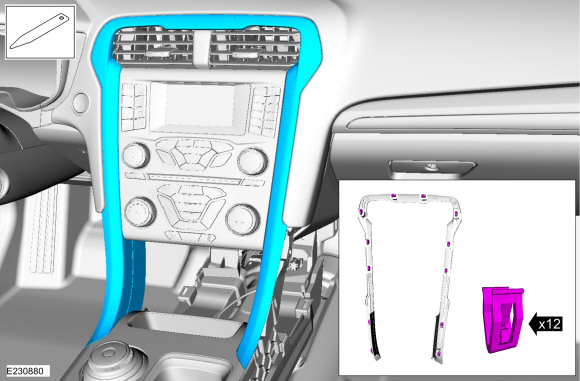
Remove the center stack trim panel.
Use the General Equipment: Interior Trim Remover
 |
-
Remove the bolts and the FCIM.
-
Disconnect the electrical connectors.
Torque: 22 lb.in (2.5 Nm)
-
Disconnect the electrical connectors.
 |
Installation
-
To install, reverse the removal procedure.
-
Upload the FCIM configuration to the scan tool by following the scan tool on-screen instructions.
 Front Control/Display Interface Module (FCDIM) - Police. Removal and Installation
Removal
NOTE:
Removal steps in this procedure may contain installation details.
NOTE:
If installing a new module, it is necessary to
upload the module configuration information to the scan tool prior to
removing the module...
 Front Controls Interface Module (FCIM) - Police. Removal and Installation
Special Tool(s) /
General Equipment
Interior Trim Remover
Removal
NOTE:
Removal steps in this procedure may contain installation details...
Other information:
Ford Fusion 2013–2020 Service Manual: Ignition Switch. Removal and Installation
Removal WARNING: Before beginning any service procedure in this section, refer to Safety Warnings in section 100-00 General Information. Failure to follow this instruction may result in serious personal injury. Follow the health and safety precautions...
Ford Fusion 2013–2020 Owners Manual: Warning Lamps and Indicators
The following warning lamps and indicators alert you to a vehicle condition that may become serious. Some lamps illuminate when you start your vehicle to make sure they work. If any lamps remain on after starting your vehicle, refer to the respective system warning lamp for further information...
Categories
- Manuals Home
- 2nd Generation Ford Fusion Owners Manual
- 2nd Generation Ford Fusion Service Manual
- Starter Motor. Removal and Installation
- Cylinder Head Temperature (CHT) Sensor. Removal and Installation
- Automatic Transmission - 6-Speed Automatic Transmission – 6F35
- New on site
- Most important about car
Manual Climate Control
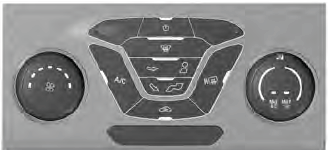
Note: Depending on your vehicle option package, the controls may look different from what you see here.

Copyright © 2026 www.fofusion2.com