
Ford Fusion: Collision Warning and Collision Avoidance System / Head Up Display (HUD) Module. Removal and Installation
Ford Fusion 2013–2020 Service Manual / Electrical / Electronic Feature Group / Collision Warning and Collision Avoidance System / Head Up Display (HUD) Module. Removal and Installation
Special Tool(s) / General Equipment
| Interior Trim Remover |
Removal
NOTE: Removal steps in this procedure may contain installation details.
-
Refer to: Health and Safety Precautions (100-00 General Information, Description and Operation). WARNING:
Before beginning any service procedure in this
section, refer to Safety Warnings in section 100-00 General Information.
Failure to follow this instruction may result in serious personal
injury.
WARNING:
Before beginning any service procedure in this
section, refer to Safety Warnings in section 100-00 General Information.
Failure to follow this instruction may result in serious personal
injury.
-
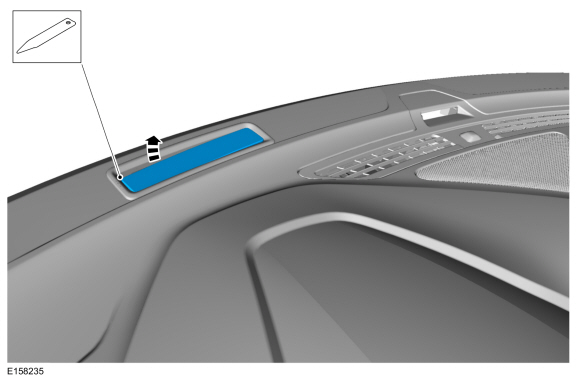
Using a non-marring tool, release the HUD tab and position the HUD aside.
Use the General Equipment: Interior Trim Remover
 |
-
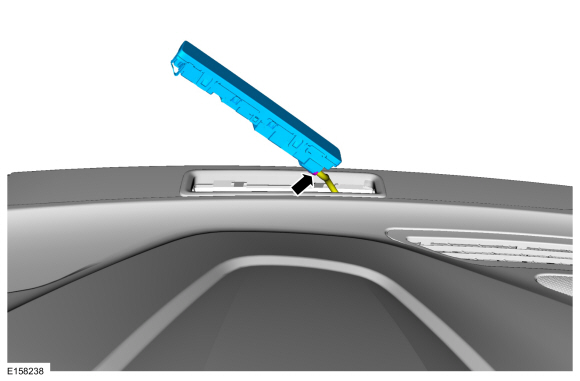
Disconnect the electrical connector and remove the HUD.
 |
Installation
-
To install, reverse the removal procedure.
 Collision Warning and Collision Avoidance System. Diagnosis and Testing
DTC Charts
Diagnostics in this manual assume a certain skill level and knowledge of Ford-specific diagnostic practices. REFER to: Diagnostic Methods (100-00 General Information, Description and Operation)...

Other information:
Ford Fusion 2013–2020 Service Manual: Wheel and Tire. Disassembly and Assembly
Special Tool(s) / General Equipment Wooden Block DISASSEMBLY NOTICE: Ford Recommends The Following For Vehicles With Carbon Fiber And Alloy Wheels: Tire Changer: Ford requires center clamp style tire changers such as Hunter® Auto 34, Revolution, TC3900 or equivalent. Anything else, especially table top style machines, are highly likely to damage the wheel which ..
Ford Fusion 2013–2020 Service Manual: Message Center - System Operation and Component Description. Description and Operation
System Operation System Diagram Item Description 1 PCM 2 Message center display 3 LH upper steering wheel switch 4 ABS module 5 PSCM 6 OCSM 7 IPC 8 BCM 9 Door ajar switches 10 Parking brake switch 11 Brake fluid level switch 12 GWM 13 Washer fluid level switch 14 S..
Categories
- Manuals Home
- 2nd Generation Ford Fusion Owners Manual
- 2nd Generation Ford Fusion Service Manual
- Main Control Valve Body. Removal and Installation
- Traction Control
- Memory Function
- New on site
- Most important about car
Parallel Parking
The system detects available parallel parking spaces and steers your vehicle into the space. You control the accelerator, gearshift and brakes. The system visually and audibly guides you into a parallel parking space.
 Press the button once to search
for a parking space.
Press the button once to search
for a parking space.

Copyright © 2026 www.fofusion2.com