
Ford Fusion: Doors and Locks
Ford Fusion 2013–2020 Owners Manual / Doors and Locks
- Locking and Unlocking
- Power Door Locks
- Remote Control
- Activating Intelligent Access
- Smart Unlocks for Intelligent Access Keys
- Autolock (If Equipped)
- Autounlock. Illuminated Entry. Illuminated Exit. Battery Saver
- Keyless Entry
- Interior Luggage Compartment Release
 Using MyKey With Remote Start Systems. MyKey – Troubleshooting
Using MyKey With Remote Start Systems
MyKey is not compatible with non
Ford-approved, aftermarket remote start
systems. If you choose to install a remote
start system, see an authorized dealer for
a Ford-approved remote start system...
 Locking and Unlocking
You can use the power door lock control
or the remote control to lock and unlock
your vehicle...
Other information:
Ford Fusion 2013–2020 Service Manual: Cabin Air Filter. Removal and Installation
Removal NOTE: Removal steps in this procedure may contain installation details. WARNING: Before beginning any service procedure in this section, refer to Safety Warnings in section 100-00 General Information. Failure to follow this instruction may result in serious personal injury. Refer to: Climate Control System Health and Safety Precautions (100-00 General Informat..
Ford Fusion 2013–2020 Service Manual: Elevation System Check. General Procedures
Check Turn the ignition ON, engine OFF. Set the parking brake. Place the gearshift in REVERSE (R) for rear parking aid sensors. Place the gearshift in DRIVE (D) for front parking aid sensors. Using a diagnostic scan tool, monitor the parking aid sensor distance Parameter Identifications (PIDs) to verify no objects are dete..
Categories
- Manuals Home
- 2nd Generation Ford Fusion Owners Manual
- 2nd Generation Ford Fusion Service Manual
- Engine
- Main Control Valve Body. Removal and Installation
- Cylinder Head. Removal and Installation
- New on site
- Most important about car
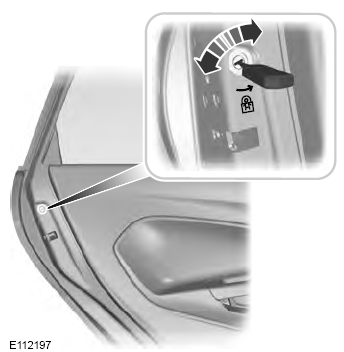
Child Safety Locks
When these locks are set, the rear doors cannot be opened from the inside.

Copyright © 2026 www.fofusion2.com