
Ford Fusion: Handles, Locks, Latches and Entry Systems / Staged Unlock Programming. General Procedures
Ford Fusion 2013–2020 Service Manual / Body and Paint / Body and Paint / Handles, Locks, Latches and Entry Systems / Staged Unlock Programming. General Procedures
Programming
-
Refer to: Health and Safety Precautions (100-00 General Information, Description and Operation). WARNING:
Before beginning any service procedure in this
manual, refer to health and safety warnings in section 100-00 General
Information. Failure to follow this instruction may result in serious
personal injury.
WARNING:
Before beginning any service procedure in this
manual, refer to health and safety warnings in section 100-00 General
Information. Failure to follow this instruction may result in serious
personal injury.
-
With the ignition in OFF, press the lock and unlock buttons on the RKE transmitter simultaneously for 4 seconds.
-
The turn signals flash twice to indicate the mode change.
-
Repeat Step 2 to enable/disable the staged unlocking feature.
 Door Latch Lubrication. General Procedures
Special Tool(s) /
General Equipment
Flat-Bladed Screwdriver
Materials
Name
Specification
Motorcraft® Multi-Purpose Grease SprayXL-5-A
ESB-M1C93-B
Activation
NOTE:
Typical left front door shown, others similar...
 Door Lock Control Switch. Removal and Installation
Removal
NOTE:
LH side shown, RH side similar.
NOTE:
Removal steps in this procedure may contain installation details.
Remove the front door trim panel...
Other information:
Ford Fusion 2013–2020 Service Manual: Front Door Upper Moulding. Removal and Installation
Removal NOTE: LH side shown, RH side similar. NOTE: Removal steps in this procedure may contain installation details. All vehicles Lower the door glass all the way down. Remove the bolt from the front and the rear of the door moulding and remove the moulding...
Ford Fusion 2013–2020 Service Manual: Parking Aid. Diagnosis and Testing
DTC Chart: Parking Aid Module (PAM) Diagnostics in this manual assume a certain skill level and knowledge of Ford-specific diagnostic practices. REFER to: Diagnostic Methods (100-00 General Information, Description and Operation). PAM DTC Chart DTC Description Action B129C:12 Left Front Side Sensor: Circuit Short To Battery ..
Categories
- Manuals Home
- 2nd Generation Ford Fusion Owners Manual
- 2nd Generation Ford Fusion Service Manual
- Under Hood Overview - 1.5L EcoBoost™, 2.0L EcoBoost™, 2.5L, 2.7L EcoBoost™
- Main Control Valve Body. Removal and Installation
- Front Controls Interface Module (FCIM). Removal and Installation
- New on site
- Most important about car
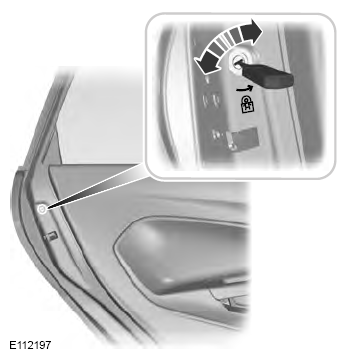
Child Safety Locks
When these locks are set, the rear doors cannot be opened from the inside.

Copyright © 2026 www.fofusion2.com