
Ford Fusion: Handles, Locks, Latches and Entry Systems / Door Lock Control Switch. Removal and Installation
Ford Fusion 2013–2020 Service Manual / Body and Paint / Body and Paint / Handles, Locks, Latches and Entry Systems / Door Lock Control Switch. Removal and Installation
Removal
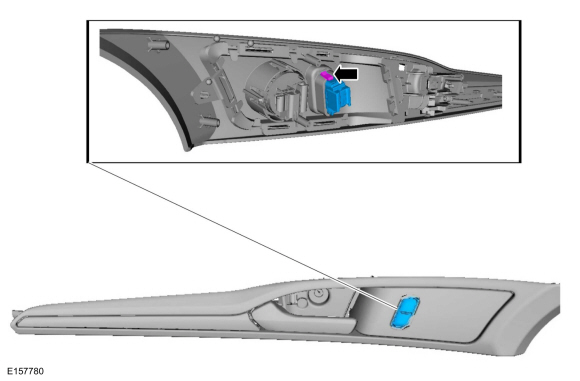
NOTE: LH side shown, RH side similar.
NOTE: Removal steps in this procedure may contain installation details.
-
Remove the front door trim panel.
Refer to: Front Door Trim Panel (501-05 Interior Trim and Ornamentation, Removal and Installation).
-
Release the retaining clips and remove the door lock control switch.
 |
Installation
-
To install, reverse the removal procedure.
 Staged Unlock Programming. General Procedures
Programming
WARNING:
Before beginning any service procedure in this
manual, refer to health and safety warnings in section 100-00 General
Information...
 Exterior Front Door Handle. Removal and Installation
Removal
Vehicles with push button start
NOTE:
LH side shown, RH side similar.
Remove the front door trim panel.
Refer to: Front Door Trim Panel (501-05 Interior Trim and Ornamentation, Removal and Installation)...
Other information:
Ford Fusion 2013–2020 Owners Manual: Refueling System Warning (If Equipped)
If the fuel tank filler valve does not fully close, a message could appear in the information display. If the message appears, do the following: Stop your vehicle as soon as it is safe to do so and switch the engine off. Shift into park (P) or neutral (N)...
Ford Fusion 2013–2020 Service Manual: Battery Cables - 1.5L EcoBoost (118kW/160PS) – I4. Removal and Installation
Removal NOTE: This procedure provides information about routing, retaining points and connectors of the cable. It does not include the steps for removing components to gain access to the cable. With the vehicle in NEUTRAL, position it on a hoist...
Categories
- Manuals Home
- 2nd Generation Ford Fusion Owners Manual
- 2nd Generation Ford Fusion Service Manual
- Starter Motor. Removal and Installation
- Body Control Module (BCM). Removal and Installation
- Engine - 1.5L EcoBoost (118kW/160PS) – I4
- New on site
- Most important about car
Manual Climate Control
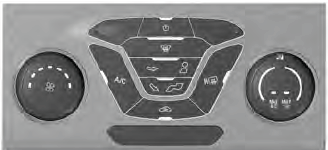
Note: Depending on your vehicle option package, the controls may look different from what you see here.

Copyright © 2026 www.fofusion2.com