
Ford Fusion: Information and Entertainment System - General Information - Vehicles With: SYNC 3 / Instrument Panel Center Speaker. Removal and Installation
Ford Fusion 2013–2020 Service Manual / Electrical / Information and Entertainment Systems / Information and Entertainment System - General Information - Vehicles With: SYNC 3 / Instrument Panel Center Speaker. Removal and Installation
Special Tool(s) / General Equipment
| Interior Trim Remover |
Removal
NOTE: Removal steps in this procedure may contain installation details.
-
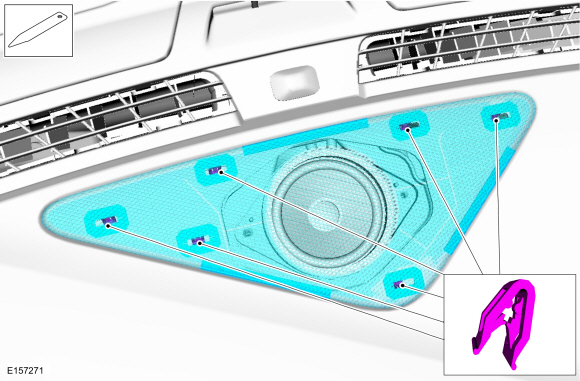
Release the clips and remove the cover.
Use the General Equipment: Interior Trim Remover
 |
-
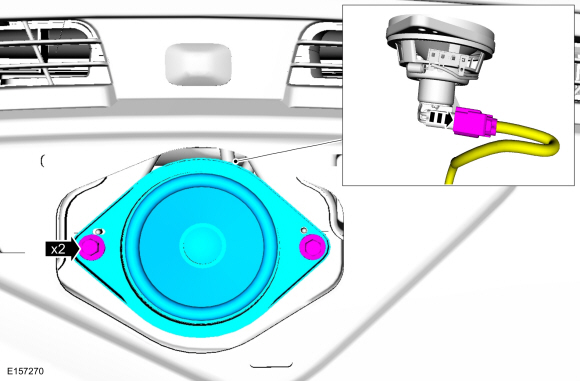
Remove the bolts and the center speaker.
-
Disconnect the electrical connector.
Torque: 18 lb.in (2 Nm)
-
Disconnect the electrical connector.
 |
Installation
-
To install, reverse the removal procedure.
 Front Door Tweeter Speaker. Removal and Installation
Removal
NOTE:
Removal steps in this procedure may contain installation details.
Remove the front door trim panel.
Refer to: Front Door Trim Panel (501-05 Interior Trim and Ornamentation, Removal and Installation)...
 Media Hub - Police. Removal and Installation
Removal
NOTE:
Removal steps in this procedure may contain installation details.
Release the tabs, disconnect the USB\ cable and remove the media hub...
Other information:
Ford Fusion 2013–2020 Service Manual: Hazard Flasher Switch. Removal and Installation
Removal NOTE: Removal steps in this procedure may contain installation details. Using a non-marring tool release and position the hazard flasher switch. Disconnect the electrical connector and remove the hazard flasher switch...
Ford Fusion 2013–2020 Service Manual: Rear Side Member Reinforcement Panel. Removal and Installation
Special Tool(s) / General Equipment Resistance Spotwelding Equipment Hot Air Gun Spot Weld Drill Bit Locking Pliers Materials Name Specification Metal Bonding AdhesiveTA-1, TA-1-B, 3M™ 08115, LORD Fusor® 108B - Removal NOTICE: Battery electric vehicle (BEV), hybrid electric vehicle (HEV) and plug-in hybrid electric vehicle (PHEV) contain a hi..
Categories
- Manuals Home
- 2nd Generation Ford Fusion Owners Manual
- 2nd Generation Ford Fusion Service Manual
- Automatic Transmission - 6-Speed Automatic Transmission – 6F35
- Traction Control
- Engine Cooling System Draining, Vacuum Filling and Bleeding. General Procedures
- New on site
- Most important about car
Fuel Quality
Choosing the Right Fuel
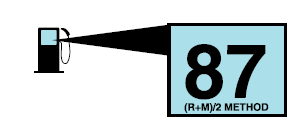
Your vehicle is designed to operate on regular unleaded gasoline with a minimum pump (R+M)/2 octane rating of 87.

Copyright © 2026 www.fofusion2.com