
Ford Fusion: Body Closures / Fuel Filler Door Assembly. Removal and Installation
Ford Fusion 2013–2020 Service Manual / Body and Paint / Body and Paint / Body Closures / Fuel Filler Door Assembly. Removal and Installation
Special Tool(s) / General Equipment
| Flat Headed Screw Driver | |
| Knife |
Removal
NOTE: The fuel filler door assembly is damaged during the removal process and requires a new fuel filler door assembly to be installed.
-
Remove the fuel tank filler pipe.
Refer to: Fuel Tank Filler Pipe (310-01A Fuel Tank and Lines - 1.5L EcoBoost (118kW/160PS) – I4, Removal and Installation).
Refer to: Fuel Tank Filler Pipe (310-01B Fuel Tank and Lines - 2.0L EcoBoost (184kW/250PS) – MI4, Removal and Installation).
Refer to: Fuel Tank Filler Pipe (310-01C Fuel Tank and Lines - 2.5L Duratec (125kW/170PS), Removal and Installation).
Refer to: Fuel Tank Filler Pipe (310-01D Fuel Tank and Lines - 2.7L EcoBoost (238kW/324PS), Removal and Installation).
-
Remove the fuel filler door.
Refer to: Fuel Filler Door (501-03 Body Closures, Removal and Installation).
-
Unseat the fuel filler door assembly boot from inside the wheel opening.
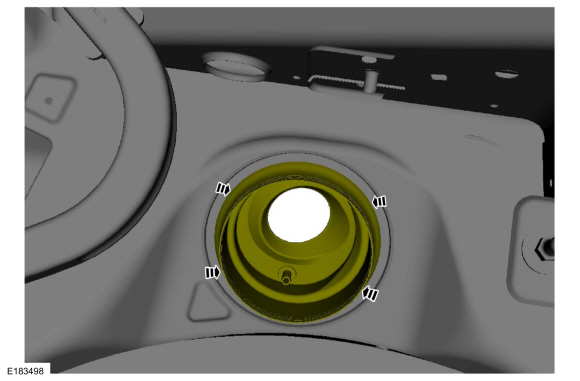 |
-
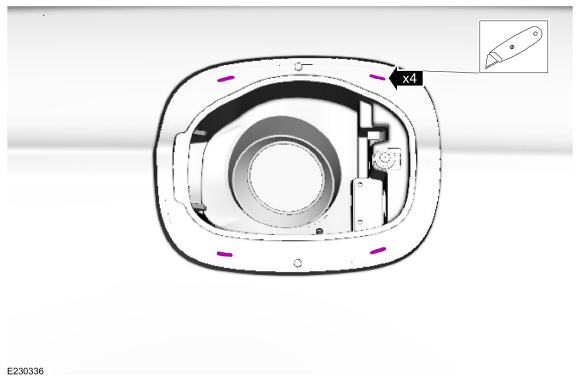
Slice the holes in the indicated areas.
Use the General Equipment: Knife
 |
-
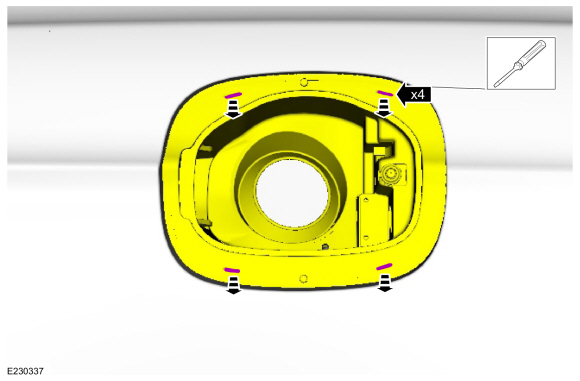
Insert the screwdriver and release the clips while pulling the fuel filler door housing away from the vehicle.
Use the General Equipment: Flat Headed Screw Driver
 |
-
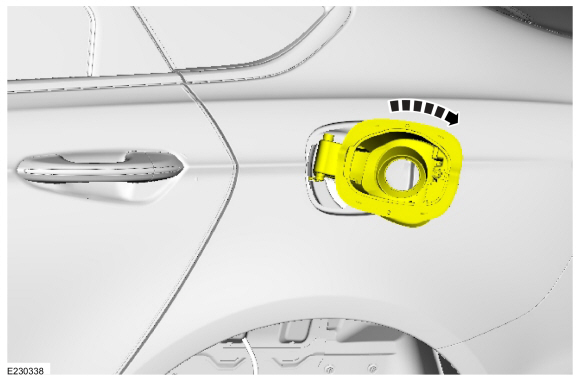
NOTE: Clearance is limited. When all four clips release, the fuel filler door housing can be rotated.
Rotate the fuel filler door housing.
 |
-
Remove the drain tube.
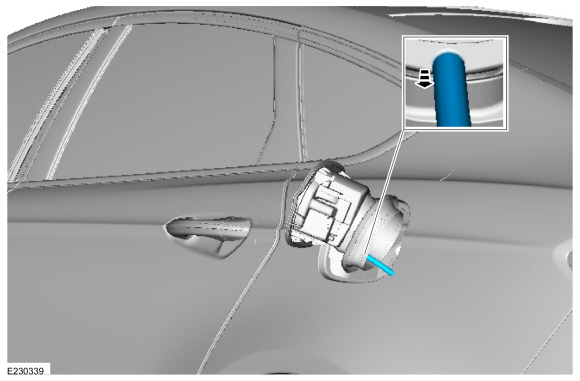 |
-
Pull the fuel filler door assembly away from the vehicle and remove.
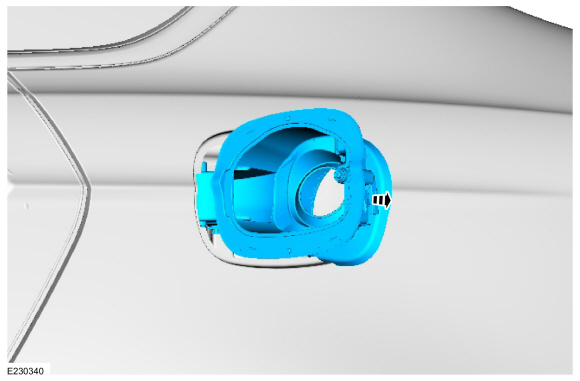 |
Installation
-
To install, reverse the removal procedure.
 Fuel Filler Door. Removal and Installation
Removal
Open the fuel filler door.
Using a screwdriver, pry the retaining tab back and slide the fuel filler door from the fuel filler door hinge...
 Front Door Check Arm. Removal and Installation
Removal
NOTE:
Left hand (LH) side shown, right hand (RH) side similar.
Remove the front door.
Refer to: Front Door (501-03 Body Closures, Removal and Installation)...
Other information:
Ford Fusion 2013–2020 Service Manual: Transmission Description. Description and Operation
Disassembled Views Auto-Start-Stop Item Part Number Description 1 70057005 Transmission case 2 7A1307A130 Clutch support tower 3 7D0197D019 Clutch support tower seals (4 required) 4 W302855W302855 Clutch support tower bolt (3 required) 5 7F2427F242 No...
Ford Fusion 2013–2020 Owners Manual: Special Operating Conditions Scheduled Maintenance
If you operate your vehicle primarily in any of the following conditions, you need to perform extra maintenance as indicated. If you operate your vehicle occasionally under any of these conditions, it is not necessary to perform the extra maintenance...
Categories
- Manuals Home
- 2nd Generation Ford Fusion Owners Manual
- 2nd Generation Ford Fusion Service Manual
- Pre-Collision Assist (IF EQUIPPED)
- Electrical
- Body Control Module (BCM). Removal and Installation
- New on site
- Most important about car
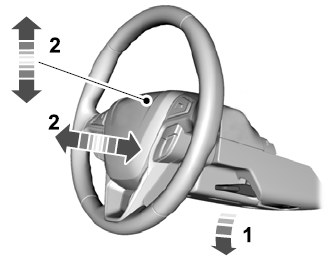
Adjusting the Steering Wheel
WARNING: Do not adjust the steering wheel when your vehicle is moving.
Note: Make sure that you are sitting in the correct position.

Copyright © 2026 www.fofusion2.com