
Ford Fusion: Instrument Panel and Console / Auxiliary Power Point. Removal and Installation
Ford Fusion 2013–2020 Service Manual / Body and Paint / Body and Paint / Instrument Panel and Console / Auxiliary Power Point. Removal and Installation
Special Tool(s) / General Equipment
 |
501-039 Remover, Power Point Socket TKIT-1998-FLM TKIT-1998-LM |
Removal
-
Refer to: Health and Safety Precautions (100-00 General Information, Description and Operation). WARNING:
Before beginning any service procedure in this
section, refer to Safety Warnings in section 100-00 General Information.
Failure to follow this instruction may result in serious personal
injury.
WARNING:
Before beginning any service procedure in this
section, refer to Safety Warnings in section 100-00 General Information.
Failure to follow this instruction may result in serious personal
injury.
-
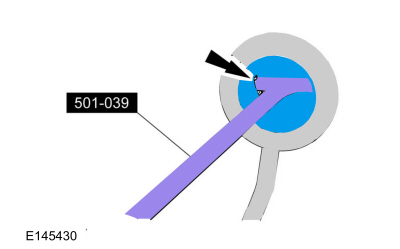
Open the power point cover.
Use Special Service Tool: 501-039 Remover, Power Point Socket.
 |
-
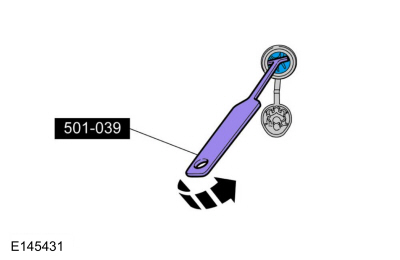
Remove the power point socket.
Use Special Service Tool: 501-039 Remover, Power Point Socket.
 |
-
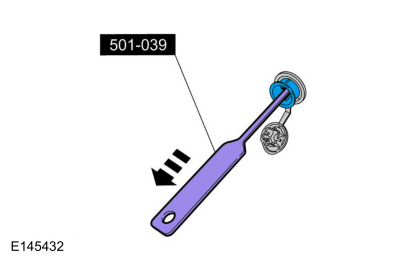
Disconnect the electrical connector.
Use Special Service Tool: 501-039 Remover, Power Point Socket.
 |
Installation
-
To install, reverse the removal procedure.
 Specifications
Torque Specifications
Item
Nm
lb-ft
lb-in
Evaporator flange nut
11
-
97
Floor console bolts
6...
 Floor Console. Removal and Installation
Special Tool(s) /
General Equipment
Interior Trim Remover
Removal
NOTE:
Removal steps in this procedure may contain installation details...
Other information:
Ford Fusion 2013–2020 Owners Manual: Child Restraint Positioning
WARNING: Do not place a rearward facing child restraint in front of an active airbag. Failure to follow this instruction could result in personal injury or death. WARNING: Properly secure children 12 years old and under in a rear seating position whenever possible...
Ford Fusion 2013–2020 Service Manual: Luggage Compartment Lid. Removal and Installation
Special Tool(s) / General Equipment Flat-Bladed Screwdriver Removal NOTE: Removal steps in this procedure may contain installation details. Open the luggage compartment lid. Position aside the luggage compartment lid pull handle cover...
Categories
- Manuals Home
- 2nd Generation Ford Fusion Owners Manual
- 2nd Generation Ford Fusion Service Manual
- Starter Motor. Removal and Installation
- Cylinder Head Temperature (CHT) Sensor. Removal and Installation
- Intake Manifold. Removal and Installation
- New on site
- Most important about car
Parallel Parking
The system detects available parallel parking spaces and steers your vehicle into the space. You control the accelerator, gearshift and brakes. The system visually and audibly guides you into a parallel parking space.
 Press the button once to search
for a parking space.
Press the button once to search
for a parking space.

Copyright © 2026 www.fofusion2.com