
Ford Fusion: Frame and Mounting / Uni-Body, Subframe and Mounting System
Ford Fusion 2013–2020 Service Manual / Body and Paint / Frame and Mounting / Uni-Body, Subframe and Mounting System
- Frame Assembly - Overview. Description and Operation
- Front Subframe - 1.5L EcoBoost (118kW/160PS) – I4/2.0L EcoBoost (184kW/250PS) – MI4/2.5L Duratec (125kW/170PS). Removal and Installation
- Front Subframe - 2.7L EcoBoost (238kW/324PS). Removal and Installation
- Rear Subframe - FWD. Removal and Installation
- Rear Subframe - AWD. Removal and Installation

 Frame Assembly - Overview. Description and Operation
Overview
The front subframe is bolted to the body and is used to:
aid in structural support.
provide mounting surfaces for the steering gear...
Other information:
Ford Fusion 2013–2020 Service Manual: Specifications
General Specifications Item Specification Normal engine cranking speed (Average) 200-300 Revolutions Per Minute (RPM) Starting circuit maximum voltage drop (Engine at normal operating temperature) (Average) 0...
Ford Fusion 2013–2020 Service Manual: Instrument Panel and Interior Switches Illumination - System Operation and Component Description. Description and Operation
System Operation System Diagram Item Description 1 FDIM 2 BCM 3 DDM 4 RDM 5 PDM 6 RDM 7 Headlamp Switch 8 Dimmable Components 9 GWM 10 Non-Dimmable Components 11 Non-Dimmable Components 12 Non-Dimmable Components 13 Non-Dimmable Components 14 Light Sensor 15 FCIM 16 APIM 17 ACM ..
Categories
- Manuals Home
- 2nd Generation Ford Fusion Owners Manual
- 2nd Generation Ford Fusion Service Manual
- Pre-Collision Assist (IF EQUIPPED)
- Automatic Transmission - 6-Speed Automatic Transmission – 6F35
- Transmission Fluid Drain and Refill. General Procedures
- New on site
- Most important about car
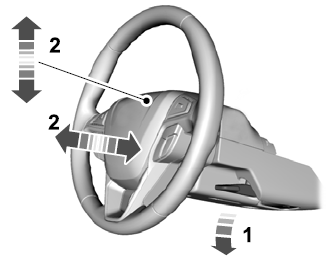
Adjusting the Steering Wheel
WARNING: Do not adjust the steering wheel when your vehicle is moving.
Note: Make sure that you are sitting in the correct position.

Copyright © 2026 www.fofusion2.com