
Ford Fusion: Automatic Transmission - 6-Speed Automatic Transmission – 6F35 / Selector Shaft Seal. Removal and Installation
Ford Fusion 2013–2020 Service Manual / Powertrain / Automatic Transmission / Automatic Transmission - 6-Speed Automatic Transmission – 6F35 / Selector Shaft Seal. Removal and Installation
Special Tool(s) / General Equipment
 |
307-581 Manual lever seal installer TKIT-2006UF-FLM TKIT-2006UF-ROW |
| Flat Headed Screw Driver | |
Removal
-
Remove the TR sensor.
Refer to: Transmission Range (TR) Sensor (307-01A Automatic Transmission - 6-Speed Automatic Transmission – 6F35, Removal and Installation).
-
Remove and discard the selector shaft seal.
Use the General Equipment: Flat Headed Screw Driver
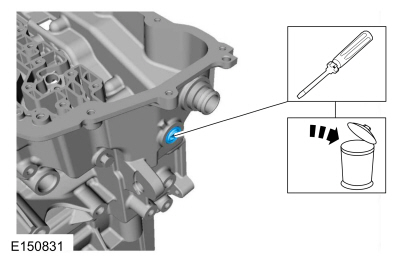 |
Installation
-
Using the special tool, install the new selector shaft seal.
Use Special Service Tool: 307-581 Manual lever seal installer.
 |
-
Install the TR sensor.
Refer to: Transmission Range (TR) Sensor (307-01A Automatic Transmission - 6-Speed Automatic Transmission – 6F35, Removal and Installation).
 Roll Restrictor RH. Removal and Installation
Removal
With the vehicle in NEUTRAL, position it on a hoist.
Refer to: Jacking and Lifting - Overview (100-02 Jacking and Lifting, Description and Operation)...
 Solenoid. Removal and Installation
Special Tool(s) /
General Equipment
Long Nose Pliers
Removal
Using the scan tool Transmission Solenoid Identification
Number (IDN) function, retrieve the solenoid base part number and
stamping number...
Other information:
Ford Fusion 2013–2020 Owners Manual: Data Recording
WARNING: Do not connect wireless plug-in devices to the data link connector. Unauthorized third parties could gain access to vehicle data and impair the performance of safety related systems. Only allow repair facilities that follow our service and repair instructions to connect their equipment to the data link connector...
Ford Fusion 2013–2020 Service Manual: Module Configuration - System Operation and Component Description. Description and Operation
System Operation Module Programming Menu Module Programming is listed under the Toolbox tab after starting an IDS session with a vehicle. The module programming menu is disabled when a manual vehicle session is created. The Module Programming menu has 4 selections: Programmable Module Installation (PMI) Module Reprogramming Programmable Parameters As-Built These selec..
Categories
- Manuals Home
- 2nd Generation Ford Fusion Owners Manual
- 2nd Generation Ford Fusion Service Manual
- Front Controls Interface Module (FCIM). Removal and Installation
- Automatic Transmission - 6-Speed Automatic Transmission – 6F35
- Powertrain
- New on site
- Most important about car
Parallel Parking
The system detects available parallel parking spaces and steers your vehicle into the space. You control the accelerator, gearshift and brakes. The system visually and audibly guides you into a parallel parking space.
 Press the button once to search
for a parking space.

Copyright © 2026 www.fofusion2.com