
Ford Fusion: Parking Aid / Front Parking Aid Sensor. Removal and Installation
Ford Fusion 2013–2020 Service Manual / Electrical / Instrumentation and Warning Systems / Parking Aid / Front Parking Aid Sensor. Removal and Installation
Removal
NOTE: Removal steps in this procedure may contain installation details.
All Sensors
-
Remove the front bumper cover.
Refer to: Front Bumper Cover (501-19 Bumpers, Removal and Installation).
Outer front parking aid sensors
-
Remove the outer front parking aid sensor.
-
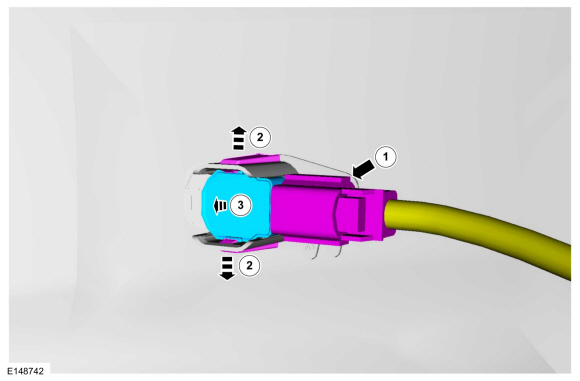
Disconnect the outer front parking aid sensor electrical connector.
-
Release the tabs.
-
Remove the outer front parking aid sensor from the bracket.
-
Disconnect the outer front parking aid sensor electrical connector.
 |
Inner front parking aid sensors
-
Remove the front bumper cover.
Refer to: Front Bumper (501-19 Bumpers, Removal and Installation).
-
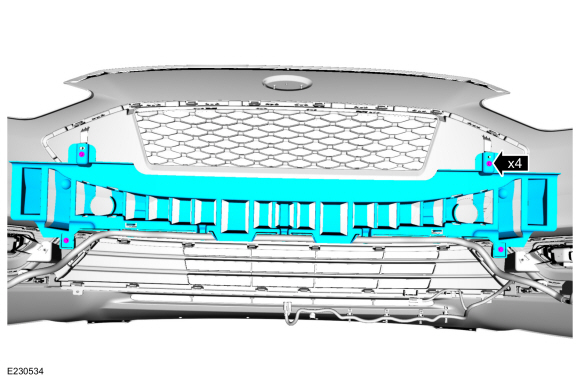
Remove the bolts and the front bumper cover reinforcement.
 |
-
Remove the inner front parking aid sensor.
-
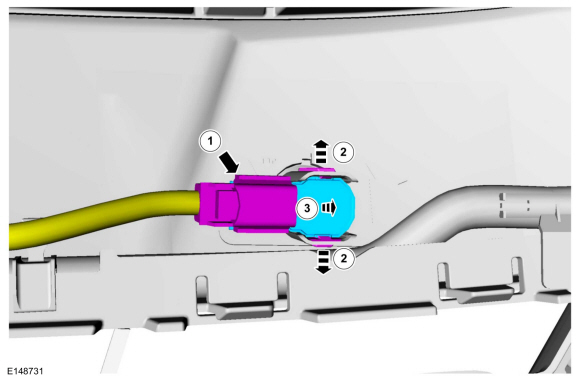
Disconnect the inner front parking aid sensor electrical connector.
-
Release the tabs.
-
Remove the inner front parking aid sensor from the bracket.
-
Disconnect the inner front parking aid sensor electrical connector.
 |
Installation
-
To install, reverse the removal procedure.
-
Carry out the azimuth and elevation system checks.
Refer to: Azimuth System Check (413-13A Parking Aid, General Procedures).
Refer to: Elevation System Check (413-13A Parking Aid, General Procedures).
 Elevation System Check. General Procedures
Check
Turn the ignition ON, engine OFF.
Set the parking brake.
Place the gearshift in REVERSE (R) for rear parking aid sensors...
 Parking Aid Camera - 4-Door. Removal and Installation
Removal
NOTE:
Removal steps in this procedure may contain installation details.
WARNING:
Before beginning any service procedure in this
section, refer to Safety Warnings in section 100-00 General Information...
Other information:
Ford Fusion 2013–2020 Service Manual: Front Stabilizer Bar Bushing. Removal and Installation
Removal NOTICE: Suspension fasteners are critical parts that affect the performance of vital components and systems. Failure of these fasteners may result in major service expense. Use the same or equivalent parts if replacement is necessary. Do not use a replacement part of lesser quality or substitute design...
Ford Fusion 2013–2020 Service Manual: Module Controlled Functions - Component Location. Description and Operation
Item Description 1 PDM 2 Rear door modules 3 RTM 4 DDM 5 DSM 6 BCM ..
Categories
- Manuals Home
- 2nd Generation Ford Fusion Owners Manual
- 2nd Generation Ford Fusion Service Manual
- Electronic Parking Brake (EPB) Service Mode Activation and Deactivation. General Procedures
- Intake Manifold. Removal and Installation
- Starter Motor. Removal and Installation
- New on site
- Most important about car
Using Seatbelts During Pregnancy
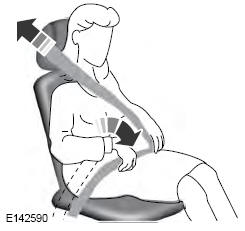
WARNING: Always ride and drive with your seatback upright and properly fasten your seatbelt. Fit the lap portion of the seatbelt snugly and low across the hips. Position the shoulder portion of the seatbelt across your chest. Pregnant women must follow this practice. See the following figure.

Copyright © 2026 www.fofusion2.com