
Ford Fusion: Information and Entertainment System - General Information - Vehicles With: SYNC 3 / Audio Front Control Module (ACM). Removal and Installation
Ford Fusion 2013–2020 Service Manual / Electrical / Information and Entertainment Systems / Information and Entertainment System - General Information - Vehicles With: SYNC 3 / Audio Front Control Module (ACM). Removal and Installation
Removal
NOTE: Make sure that any media is ejected from unit.
NOTE: Removal steps in this procedure may contain installation details.
-
Refer to: Health and Safety Precautions (100-00 General Information, Description and Operation). WARNING:
Before beginning any service procedure in this
section, refer to Safety Warnings in section 100-00 General Information.
Failure to follow this instruction may result in serious personal
injury.
WARNING:
Before beginning any service procedure in this
section, refer to Safety Warnings in section 100-00 General Information.
Failure to follow this instruction may result in serious personal
injury.
-
NOTE: If installing a new module, it is necessary to upload the module configuration information to the scan tool prior to removing the module. This information must be downloaded into the new module after installation.
Upload the ACM configuration to the scan tool by following the scan tool on-screen instructions.
-
Remove the FCIM.
Refer to: Front Controls Interface Module (FCIM) (415-00 Information and Entertainment System - General Information - Vehicles With: AM/FM/CD/SYNC/Touchscreen Display) .
-
Remove the bolts and the ACM.
-
Disconnect the electrical connectors.
Torque: 22 lb.in (2.5 Nm)
-
Disconnect the electrical connectors.
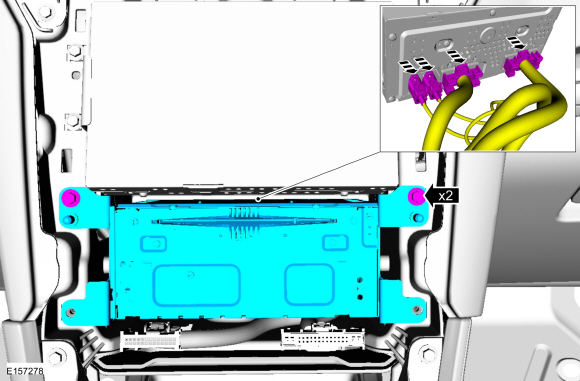 |
Installation
-
To install, reverse the removal procedure.
-
Download the ACM configuration information from the scan tool to the new ACM following the scan tool on-screen instructions.
 Audio Digital Signal Processing (DSP) Module. Removal and Installation
Removal
NOTE:
Removal steps in this procedure may contain installation details.
WARNING:
Before beginning any service procedure in this
section, refer to Safety Warnings in section 100-00 General Information...
 Audio Front Control Module (ACM) - Police. Removal and Installation
Removal
NOTE:
Make sure that any media is ejected from unit.
NOTE:
Removal steps in this procedure may contain installation details.
NOTE:
If installing a new module, it is necessary to
upload the module configuration information to the scan tool prior to
removing the module...
Other information:
Ford Fusion 2013–2020 Service Manual: Fuel Filler Door Assembly. Removal and Installation
Special Tool(s) / General Equipment Flat Headed Screw Driver Knife Removal NOTE: The fuel filler door assembly is damaged during the removal process and requires a new fuel filler door assembly to be installed. Remove the fuel tank filler pipe...
Ford Fusion 2013–2020 Service Manual: Halfshaft Seal RH - FWD. Removal and Installation
Special Tool(s) / General Equipment 205-153 (T80T-4000-W) Handle 307-718Installer, Axle SealTKIT-2013B-FLTKIT-2013B-ROW Puller Punch Removal Remove the RH halfshaft. Refer to: Front Halfshaft RH (205-04 Front Drive Halfshafts, Removal and Installation)...
Categories
- Manuals Home
- 2nd Generation Ford Fusion Owners Manual
- 2nd Generation Ford Fusion Service Manual
- Intake Manifold. Removal and Installation
- Traction Control
- Cylinder Head Temperature (CHT) Sensor. Removal and Installation
- New on site
- Most important about car
Fuel Quality
Choosing the Right Fuel
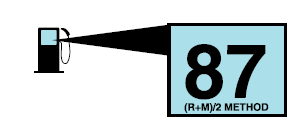
Your vehicle is designed to operate on regular unleaded gasoline with a minimum pump (R+M)/2 octane rating of 87.

Copyright © 2026 www.fofusion2.com