
Ford Fusion: Lighting / Ambient Lighting (IF EQUIPPED)
Ford Fusion 2013–2020 Owners Manual / Lighting / Ambient Lighting (IF EQUIPPED)
Use the touchscreen to select the following:
 Select the settings option on
the
feature bar.
Select the settings option on
the
feature bar.
 Select ambient lighting.
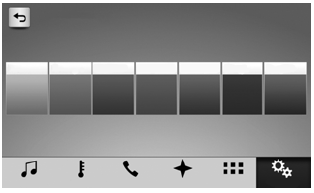
Switching Ambient Lighting On
Touch a color once.
Changing the Color
Touch any color once.
Adjusting the Brightness
Drag the selected color up or down.
Switching Ambient Lighting Off
Touch the selected color once or drag the selected color down to zero brightness.
 Direction Indicators. Interior Lamps
Direction Indicators
Push the lever up or down to use the
direction indicators.
Note: Tap the lever up or down to make the
direction indicators flash three times to
indicate a lane change...

Other information:
Ford Fusion 2013–2020 Service Manual: Driver Side Register Air Discharge Temperature Sensor. Removal and Installation
Removal NOTE: Removal steps in this procedure may contain installation details. WARNING: Before beginning any service procedure in this section, refer to Safety Warnings in section 100-00 General Information. Failure to follow this instruction may result in serious personal injury. Refer to: Climate Control System Health and Safety Precautions (100-00 General Informat..
Ford Fusion 2013–2020 Service Manual: Battery Drain Check. General Procedures
Check NOTE: No factory-equipped vehicle should have more than a 25 mA (0.025 amp) – 50 mA (0.050) draw depending on the vehicle's accessories. Check for current drains on the battery in excess of 25 mA (0.025 amp) – 50 mA (0.050) with all the electrical accessories off and the vehicle at rest for at least 40 minutes. Current drains can be tested with the following procedure. NOTE: ..
Categories
- Manuals Home
- 2nd Generation Ford Fusion Owners Manual
- 2nd Generation Ford Fusion Service Manual
- Intake Manifold. Removal and Installation
- Automatic Transmission Fluid Check - 1.5L EcoBoost™/2.0L EcoBoost™/2.5L. Automatic Transmission Fluid Check - 2.7L EcoBoost™
- Memory Function
- New on site
- Most important about car
Parallel Parking
The system detects available parallel parking spaces and steers your vehicle into the space. You control the accelerator, gearshift and brakes. The system visually and audibly guides you into a parallel parking space.
 Press the button once to search
for a parking space.
Press the button once to search
for a parking space.

Copyright © 2026 www.fofusion2.com