
Ford Fusion: Voltage Converter/Inverter / Alternating Current (AC) Power Outlet Socket. Removal and Installation
Ford Fusion 2013–2020 Service Manual / Electrical / Battery and Charging System / Voltage Converter/Inverter / Alternating Current (AC) Power Outlet Socket. Removal and Installation
Removal
 WARNING:
Disconnect the battery before servicing the direct current
to alternating current (DC-AC) inverter or alternating current (AC)
powerpoint to prevent the risk of high voltage shock. Failure to follow
this instruction may result in serious personal injury.
WARNING:
Disconnect the battery before servicing the direct current
to alternating current (DC-AC) inverter or alternating current (AC)
powerpoint to prevent the risk of high voltage shock. Failure to follow
this instruction may result in serious personal injury.
-
Follow the health and safety precautions. WARNING:
Before beginning any service procedure in this
section, refer to Safety Warnings in section 100-00 General Information.
Failure to follow this instruction may result in serious personal
injury.
WARNING:
Before beginning any service procedure in this
section, refer to Safety Warnings in section 100-00 General Information.
Failure to follow this instruction may result in serious personal
injury.
Refer to: Health and Safety Precautions (100-00 General Information, Description and Operation).
-
Disconnect the battery.
Refer to: Battery Disconnect and Connect (414-01 Battery, Mounting and Cables, General Procedures).
-
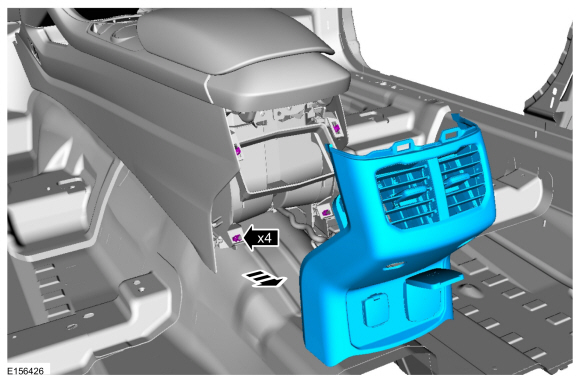
Release the clips and remove the floor console rear trim panel.
 |
-
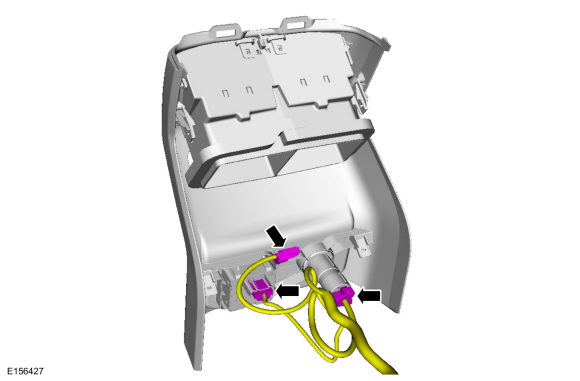
Disconnect the electrical connectors from the floor console rear trim panel.
 |
-
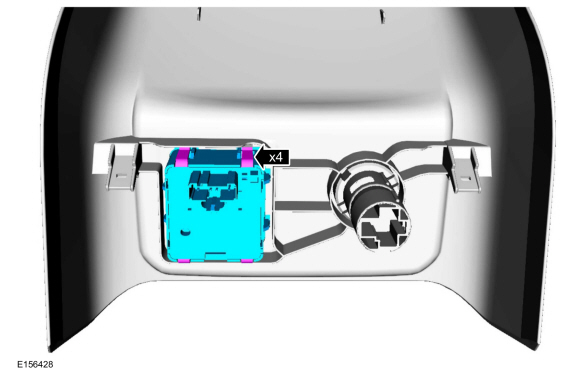
Release the tabs and remove the AC power outlet socket.
 |
Installation
-
To install, reverse the removal procedure.
 Direct Current/Direct Current (DC/DC) Converter Control Module. Diagnosis and Testing
Diagnostics in this manual assume a certain skill level and knowledge of Ford-specific diagnostic practices. REFER to: Diagnostic Methods (100-00 General Information, Description and Operation)...
 Direct Current/Alternating Current (DC/AC) Inverter. Removal and Installation
Removal
WARNING:
Disconnect the battery before servicing the direct current
to alternating current (DC-AC) inverter or alternating current (AC)
powerpoint to prevent the risk of high voltage shock...
Other information:
Ford Fusion 2013–2020 Service Manual: Fuel System Pressure Release. General Procedures
Pressure release WARNING: Before beginning any service procedure in this section, refer to Safety Warnings in section 100-00 General Information. Failure to follow this instruction may result in serious personal injury. Refer to: Gasoline and Gasoline-Ethanol Fuel Systems Health and Safety Precautions (100-00 General Information, Description and Operation)...
Ford Fusion 2013–2020 Owners Manual: Setting the Gap Distance
You can decrease or increase the distance between your vehicle and the vehicle in front by pressing the gap control. Press and release to decrease the gap distance. Press and release to increase the gap distance. The selected gap appears in the information display as shown by the bars in the image...
Categories
- Manuals Home
- 2nd Generation Ford Fusion Owners Manual
- 2nd Generation Ford Fusion Service Manual
- Starter Motor. Removal and Installation
- Electronic Parking Brake (EPB) Service Mode Activation and Deactivation. General Procedures
- Memory Function
- New on site
- Most important about car
Direction Indicators. Interior Lamps
Direction Indicators
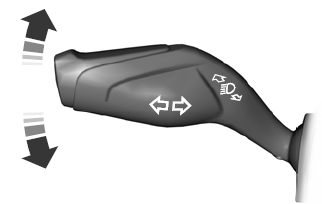
Push the lever up or down to use the direction indicators.

Copyright © 2026 www.fofusion2.com