
Ford Fusion: Automatic Transmission - 6-Speed Automatic Transmission – 6F35 / Adaptive Learning Drive Cycle. General Procedures
Ford Fusion 2013–2020 Service Manual / Powertrain / Automatic Transmission / Automatic Transmission - 6-Speed Automatic Transmission – 6F35 / Adaptive Learning Drive Cycle. General Procedures
Initialization
NOTE: The engine and transmission must be at normal operating temperature.
-
Using the scan tool, clear the DTC and Transmission Adaptive Tables.
-
Bring the transmission to normal operating temperature.
-
With the engine running and the brake applied, select
the gears in the following order, pausing in each gear for 4 seconds: N,
R, N, D, R, D, N. Repeat this pattern 2 times. If any engagements feel
soft or harsh, repeat this procedure.
-
Drive the vehicle and accelerate at a moderate throttle
so that the upshifts occur at 2,000 rpm up to 80 km/h (50 mph) and brake
moderately to a stop. Repeat this pattern 2 times.
-
Drive the vehicle and accelerate at a moderate throttle
so the upshifts occur at 3,000 rpm up to 80 km/h (50 mph) and brake
moderately to a stop. Repeat this pattern 2 times.
-
With the engine running and the brake applied, select
the gears in the following order, pausing in each gear for 4 seconds: N,
R, N, D, R, D, N. Repeat this pattern 2 times.
 Torque Converter Clutch (TCC). Diagnosis and Testing
For TCC operation, REFER to: Transmission Description - System Operation and Component Description (307-01A Automatic Transmission - 6-Speed Automatic Transmission – 6F35, Description and Operation)...
 Transmission Case Reseal. General Procedures
Special Tool(s) /
General Equipment
100-001
(T50T-100-A)
Slide Hammer
205-153
(T80T-4000-W)
Handle
205-990Installer, Axle SealTKIT-2012A-FLTKIT-2012A-ROW
303-D011
(D80L-100-G)
Actuator Pin (Dia 3/16)
303-D019
(D80L-100-Q)
Collet, 3/4 to 7/8
307-003
(T57L-500-B)
Holding Fixture, Transmission
307-091Handle, Torque ConverterTKIT-2009TC-F
..
Other information:
Ford Fusion 2013–2020 Owners Manual: Hill Start Assist
WARNING: The system does not replace the parking brake. When you leave your vehicle, always apply the parking brake. WARNING: You must remain in your vehicle when the system turns on. At all times, you are responsible for controlling your vehicle, supervising the system and intervening, if required. Failure to take care may result in the loss of control of your vehicle, serious personal ..
Ford Fusion 2013–2020 Service Manual: Parking Aid - Overview. Description and Operation
Parking Aid - Audible The rear parking aid system sounds a warning tone through the rear audio speakers to alert the driver of stationary objects near the rear bumper when reverse is selected. The parking aid system assists the driver in detecting certain objects while the vehicle moves slowly in REVERSE at speeds of less than 4.8 km/h (3 mph). The rear parking aid system may not detect m..
Categories
- Manuals Home
- 2nd Generation Ford Fusion Owners Manual
- 2nd Generation Ford Fusion Service Manual
- Pre-Collision Assist (IF EQUIPPED)
- Engine - 1.5L EcoBoost (118kW/160PS) – I4
- Powertrain
- New on site
- Most important about car
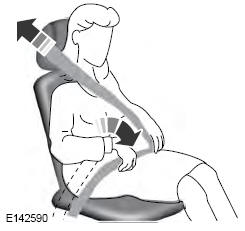
Using Seatbelts During Pregnancy
WARNING: Always ride and drive with your seatback upright and properly fasten your seatbelt. Fit the lap portion of the seatbelt snugly and low across the hips. Position the shoulder portion of the seatbelt across your chest. Pregnant women must follow this practice. See the following figure.

Copyright © 2026 www.fofusion2.com