
Ford Fusion: Chassis / Suspension
Ford Fusion 2013–2020 Service Manual / Chassis / Suspension
- Suspension System - General Information
- Front Suspension
- Rear Suspension
- Wheels and Tires
- Tire Pressure Monitoring System (TPMS)
- Vehicle Dynamic Suspension
 Chassis
..

Other information:
Ford Fusion 2013–2020 Owners Manual: Settings
Press the button to enter the settings menu. Once you select a tile, press the button next to a menu item to view an explanation of the feature or setting. Sound Select this tile to adjust sound the settings. Clock Select this tile to adjust the clock settings. Bluetooth Select this tile to switch Bluetooth on and off and adjust the settings. Phone Select this tile to connect, disconnect, ..
Ford Fusion 2013–2020 Service Manual: Rear View Mirrors - System Operation and Component Description. Description and Operation
System Operation System Diagram - Exterior, Power (Without Memory) Item Description 1 DDM 2 PDM 3 Motors 4 LH exterior mirror 5 Exterior mirror control switch 6 LH front door window control switch 7 Motors 8 RH exterior mirror Network Message Chart Module Network Input Messages — PDM ..
Categories
- Manuals Home
- 2nd Generation Ford Fusion Owners Manual
- 2nd Generation Ford Fusion Service Manual
- Transmission Fluid Drain and Refill. General Procedures
- Electronic Parking Brake (EPB) Service Mode Activation and Deactivation. General Procedures
- Traction Control
- New on site
- Most important about car
Manual Climate Control
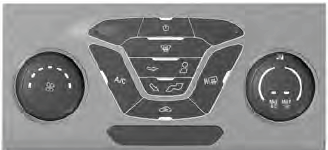
Note: Depending on your vehicle option package, the controls may look different from what you see here.

Copyright © 2026 www.fofusion2.com