
Ford Fusion: Multifunction Electronic Modules / Radio Transceiver Module (RTM). Removal and Installation
Removal
NOTICE: Use care to not crease the headliner during removal and installation or damage to the headliner can occur.
NOTE: Removal steps in this procedure may contain installation details.
-
Refer to: Health and Safety Precautions (100-00 General Information, Description and Operation). WARNING:
Before beginning any service procedure in this
section, refer to Safety Warnings in section 100-00 General Information.
Failure to follow this instruction may result in serious personal
injury.
WARNING:
Before beginning any service procedure in this
section, refer to Safety Warnings in section 100-00 General Information.
Failure to follow this instruction may result in serious personal
injury.
-
On both sides, remove the A-pillar trim panel.
Refer to: A-Pillar Trim Panel (501-05 Interior Trim and Ornamentation, Removal and Installation).
-
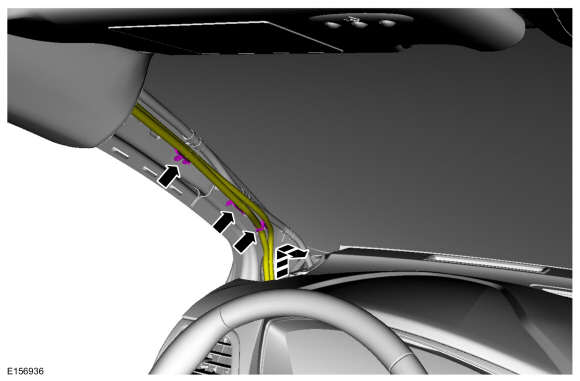
NOTE: Vehicle with roof opening panel shown, vehicle without roof opening panel similar.
Release the clips and position the LH wire harness aside.
 |
-
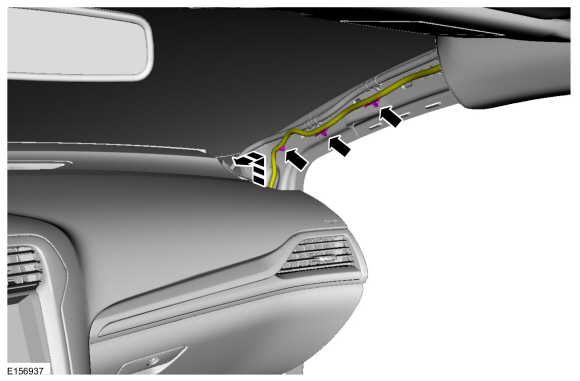
Vehicles equipped with rain sensing wipers.
Release the clips and position the RH wire harness aside.
 |
-
On both sides, remove the B-pillar trim panel.
Refer to: B-Pillar Trim Panel (501-05 Interior Trim and Ornamentation, Removal and Installation).
-
On both sides, remove the C-pillar trim panel.
Refer to: C-Pillar Upper Trim Panel (501-05 Interior Trim and Ornamentation, Removal and Installation).
-
If equipped.
-
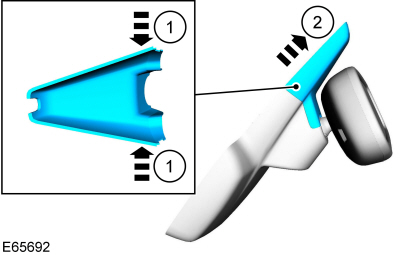
Release the upper rear view mirror cover clips.
-
Remove the upper rear view mirror cover.
-
Release the upper rear view mirror cover clips.
 |
-
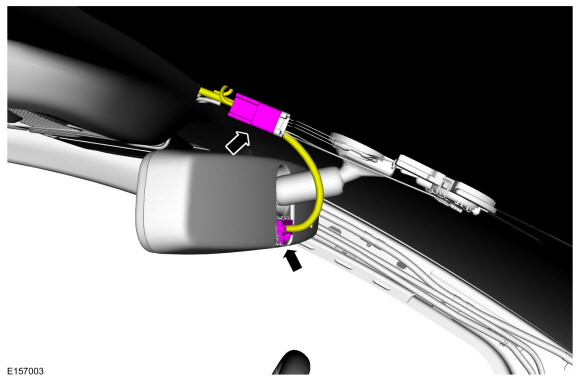
If equipped.
Disconnect the rear view mirror electrical connectors.
 |
-
NOTE: RH side shown, LH side similar.
On both sides.
Remove the sun visor.
-
Remove the retainer cover.
-
Release the clip.
-
Remove the sun visor.
-
Disconnect the electrical connector.
-
Remove the retainer cover.
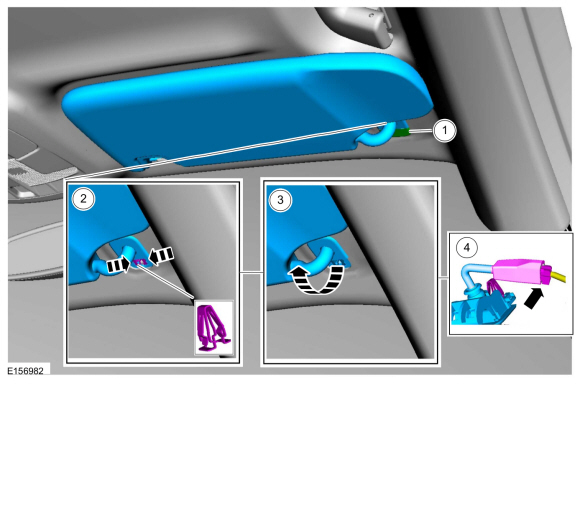 |
-
NOTE: RH side shown, LH side similar.
On both sides.
Remove the screw and the sun visor clip.
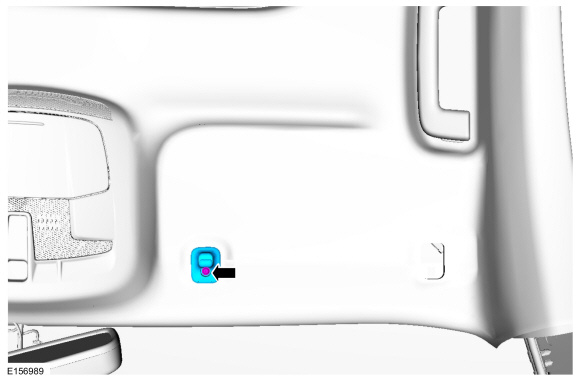 |
-
All.
Open the screw covers, remove the screws and the grab handle.
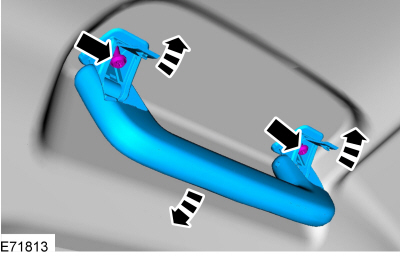 |
-
Release the headliner magnets and lower the headliner.
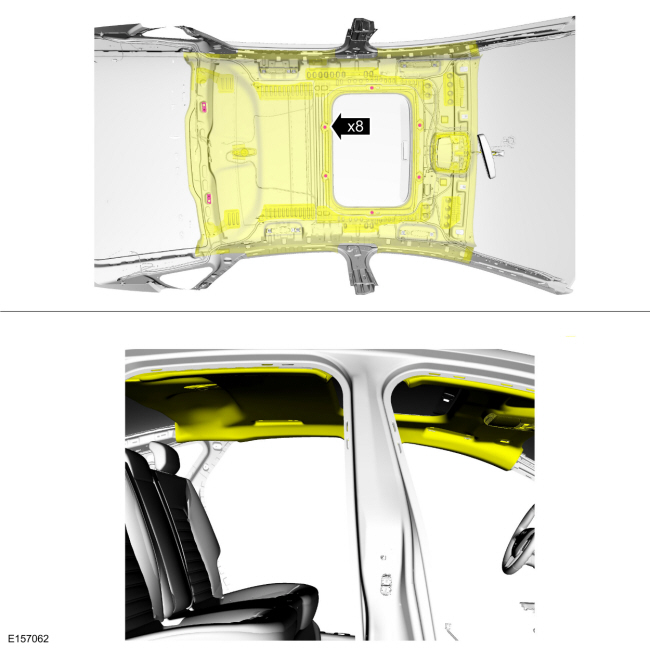 |
-
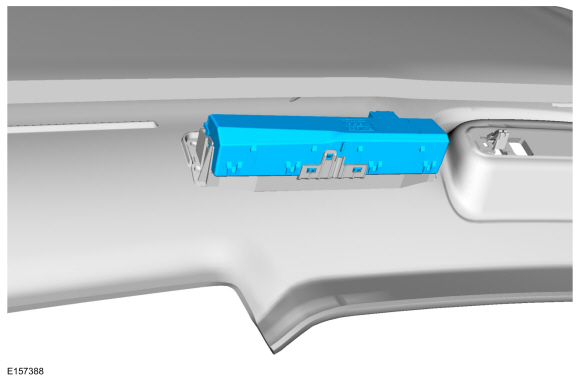
Disconnect the electrical connector, release the tabs and remove the RTM.
 |
Installation
-
NOTE: Transfer parts as necessary.
To install, reverse the removal procedure.
-
NOTE: This step is only necessary when installing a new component.
Using a diagnostic scan tool, complete the PMI process for the RTM following the on-screen instructions.
 Passenger Door Module (PDM). Removal and Installation
Removal
NOTE:
Removal steps in this procedure may contain installation details.
WARNING:
Before beginning any service procedure in this
section, refer to Safety Warnings in section 100-00 General Information...
 Rear Door Module (RDM). Removal and Installation
Removal
NOTE:
Removal steps in this procedure may contain installation details.
WARNING:
Before beginning any service procedure in this
section, refer to Safety Warnings in section 100-00 General Information...
Other information:
Ford Fusion 2013–2020 Service Manual: Transmission Description - Overview. Description and Operation
Overview This automatic transmission is a 6-speed transmission with electronic shift control. It is designed for operation in a transverse powertrain for FWD and AWD vehicles. This transmission has a 4-element torque converter design, which includes a TCC and a geartrain with 3 planetary gearsets...
Ford Fusion 2013–2020 Service Manual: Staged Unlock Programming. General Procedures
Programming WARNING: Before beginning any service procedure in this manual, refer to health and safety warnings in section 100-00 General Information. Failure to follow this instruction may result in serious personal injury. Refer to: Health and Safety Precautions (100-00 General Information, Description and Operation)...
Categories
- Manuals Home
- 2nd Generation Ford Fusion Owners Manual
- 2nd Generation Ford Fusion Service Manual
- Cylinder Head Temperature (CHT) Sensor. Removal and Installation
- Cylinder Head. Removal and Installation
- Starter Motor. Removal and Installation
- New on site
- Most important about car
Manual Climate Control
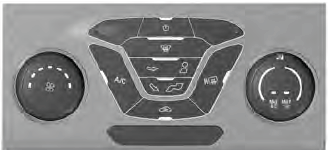
Note: Depending on your vehicle option package, the controls may look different from what you see here.
