
Ford Fusion: Parking Brake and Actuation / Parking Brake Switch. Removal and Installation
Ford Fusion 2013–2020 Service Manual / Chassis / Brake System / Parking Brake and Actuation / Parking Brake Switch. Removal and Installation
Special Tool(s) / General Equipment
| Interior Trim Remover |
Removal
NOTE: Removal steps in this procedure may contain installation details.
-
Open the floor console stowage bin lid.
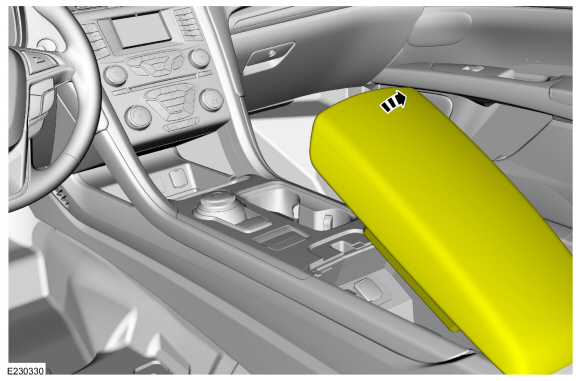 |
-
On both sides.
Detach the clips and remove the floor console upper side finish panels.
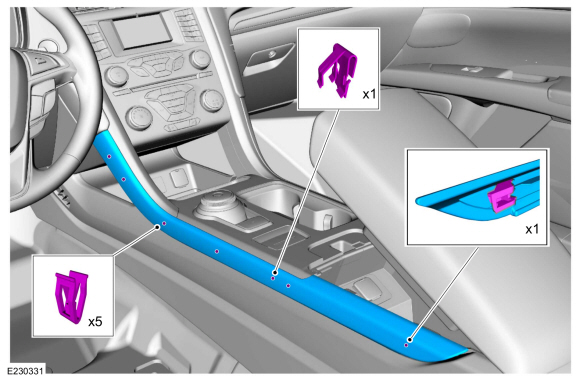 |
-
Detach the clips and remove the instrument panel center finish panel.
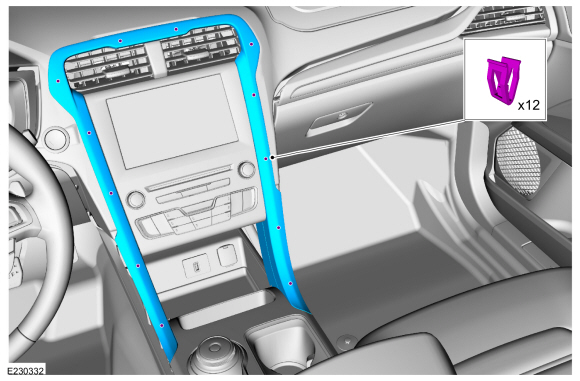 |
-
Remove the screws, detach the clips and remove the upper floor console finish panel.
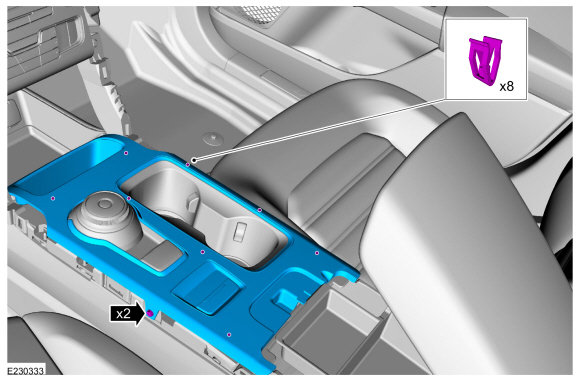 |
-
NOTE: RH side shown, LH side similar.
On both sides.
Release the push pin, clips starting from front to rear. Disengage the finger tab at the bottom rear corner and remove the floor console side trim panel.
Use the General Equipment: Interior Trim Remover
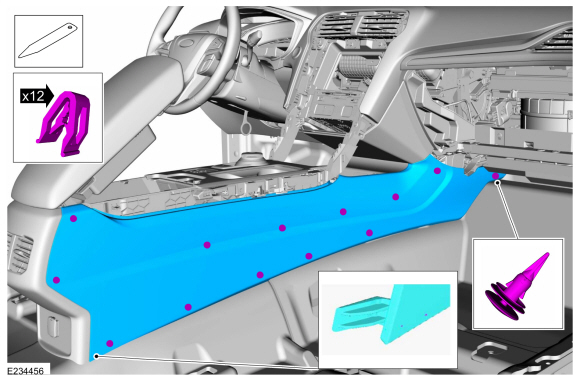 |
-
-
Remove the screws.
-
Detach the clips and position the floor console upper support to access the parking brake switch.
-
Disconnect the electrical connector.
-
Remove the parking brake switch.
-
Remove the screws.
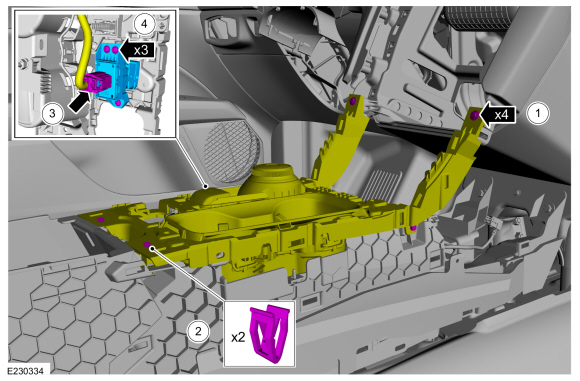 |
Installation
-
To install, reverse the removal procedure.
-
NOTE: Anytime the parking brake switch electrical connector has been disconnected, the EPB system is deactivated and a DTC is stored in the ABS module. Perform the following step to restore the EPB system and clear the ABS module DTC.
Apply and release the parking brake twice within 5 seconds, pausing with the switch in the NEUTRAL position for approximately one-half second between each apply and release.
 Parking Brake Actuator Motor. Removal and Installation
Removal
NOTE:
Removal steps in this procedure may contain installation details.
With the vehicle in NEUTRAL, position it on a hoist.
Refer to: Jacking and Lifting - Overview (100-02 Jacking and Lifting, Description and Operation)...

Other information:
Ford Fusion 2013–2020 Service Manual: Rear Door Window Regulator Motor. Removal and Installation
Removal Remove the rear door window regulator. Refer to: Rear Door Window Regulator (501-11 Glass, Frames and Mechanisms, Removal and Installation). Remove the rear door window regulator motor. Remove the retainer. Remove the retainers. NOTE: Locating studs must not be removed. Inspect the studs. Installation ..
Ford Fusion 2013–2020 Service Manual: Collision Warning and Collision Avoidance System. Diagnosis and Testing
DTC Charts Diagnostics in this manual assume a certain skill level and knowledge of Ford-specific diagnostic practices. REFER to: Diagnostic Methods (100-00 General Information, Description and Operation). HUD DTC Chart DTC Description Action U0104:00 Lost Communication With Cruise Control Module: No Sub Type Information &..
Categories
- Manuals Home
- 2nd Generation Ford Fusion Owners Manual
- 2nd Generation Ford Fusion Service Manual
- Memory Function
- Transmission - 1.5L EcoBoost (118kW/160PS) – I4. Removal and Installation
- Load Carrying
- New on site
- Most important about car
Parallel Parking
The system detects available parallel parking spaces and steers your vehicle into the space. You control the accelerator, gearshift and brakes. The system visually and audibly guides you into a parallel parking space.
 Press the button once to search
for a parking space.
Press the button once to search
for a parking space.

Copyright © 2026 www.fofusion2.com