Ford Fusion: Supplemental Restraint System / Front Impact Severity Sensor. Removal and Installation
Removal
NOTE: Removal steps in this procedure may contain installation details.
-
If installing a new component for a SRS fault, continue to Step 2. Otherwise, turn the ignition off, wait at least one minute and continue to Step 3. WARNING:
Turn the ignition OFF and wait one minute to deplete
the backup power supply. Ignition must remain OFF until repair is
complete. Failure to follow this instruction may result in serious
personal injury or death in the event of an accidental deployment.
WARNING:
Turn the ignition OFF and wait one minute to deplete
the backup power supply. Ignition must remain OFF until repair is
complete. Failure to follow this instruction may result in serious
personal injury or death in the event of an accidental deployment.
-
Depower the SRS.
Refer to: Supplemental Restraint System (SRS) Depowering and Repowering (501-20 Supplemental Restraint System) .
-
-
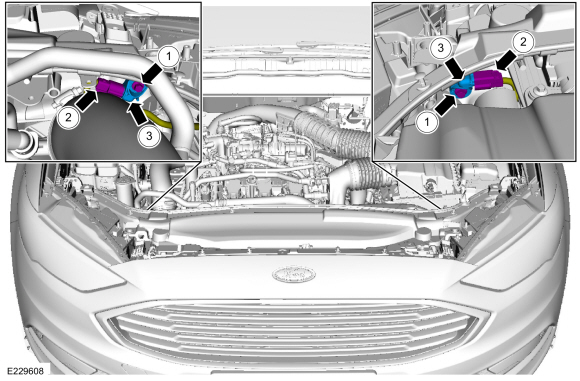
Remove the bolt.
Torque: 93 lb.in (10.5 Nm)
-
Disconnect the electrical connector.
-
Remove the front impact severity sensor.
-
Remove the bolt.
 |
Installation
-
NOTE: Make sure the front impact severity sensor mating surfaces are clean and free of foreign material.
To install, reverse the removal procedure.
-
If the SRS was depowered, repower the SRS.
Refer to: Supplemental Restraint System (SRS) Depowering and Repowering (501-20 Supplemental Restraint System) .
 Front Door Side Impact Sensor. Removal and Installation
Removal
NOTE:
Removal steps in this procedure may contain installation details.
WARNING:
Turn the ignition OFF and wait one minute to deplete
the backup power supply...
 Occupant Classification System (OCS) Sensor. Removal and Installation
Removal
NOTICE:
To prevent system failure, carry out the OCS reset when a front passenger seat cushion is disassembled, a new trim cover is installed or an OCS service kit is installed...
Other information:
Ford Fusion 2013–2020 Service Manual: Low/Reverse Clutch Assembly. Diagnosis and Testing
Low/Reverse Clutch For low/reverse clutch operation, REFER to: Transmission Description - System Operation and Component Description (307-01A Automatic Transmission - 6-Speed Automatic Transmission – 6F35, Description and Operation). REFER to: Low/Reverse Clutch Assembly (307-01A Automatic Transmission - 6-Speed Automatic Transmission – 6F35, Description and Operation)...
Ford Fusion 2013–2020 Service Manual: Lower Arm. Removal and Installation
Special Tool(s) / General Equipment Vehicle/Axle Stands Removal NOTICE: Suspension fasteners are critical parts that affect the performance of vital components and systems. Failure of these fasteners may result in major service expense...
Categories
- Manuals Home
- 2nd Generation Ford Fusion Owners Manual
- 2nd Generation Ford Fusion Service Manual
- Engine Cooling System Draining, Vacuum Filling and Bleeding. General Procedures
- Front Controls Interface Module (FCIM). Removal and Installation
- Transmission Fluid Drain and Refill. General Procedures
- New on site
- Most important about car
Using Seatbelts During Pregnancy
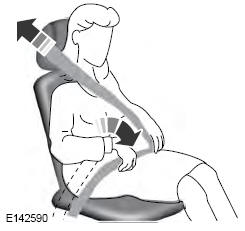
WARNING: Always ride and drive with your seatback upright and properly fasten your seatbelt. Fit the lap portion of the seatbelt snugly and low across the hips. Position the shoulder portion of the seatbelt across your chest. Pregnant women must follow this practice. See the following figure.