
Ford Fusion: Supplemental Restraint System / C-Pillar Side Impact Sensor. Removal and Installation
Ford Fusion 2013–2020 Service Manual / Body and Paint / Body and Paint / Supplemental Restraint System / C-Pillar Side Impact Sensor. Removal and Installation
Removal
NOTE: Removal steps in this procedure may contain installation details.
-
If installing a new component for a SRS fault, continue to Step 2. Otherwise, turn the ignition off, wait at least one minute and continue to Step 3. WARNING:
Turn the ignition OFF and wait one minute to deplete
the backup power supply. Ignition must remain OFF until repair is
complete. Failure to follow this instruction may result in serious
personal injury or death in the event of an accidental deployment.
WARNING:
Turn the ignition OFF and wait one minute to deplete
the backup power supply. Ignition must remain OFF until repair is
complete. Failure to follow this instruction may result in serious
personal injury or death in the event of an accidental deployment.
-
Depower the SRS.
Refer to: Supplemental Restraint System (SRS) Depowering and Repowering (501-20B Supplemental Restraint System, General Procedures).
-
Remove the C-pillar lower trim panel.
Refer to: C-Pillar Lower Trim Panel (501-05 Interior Trim and Ornamentation, Removal and Installation).
-
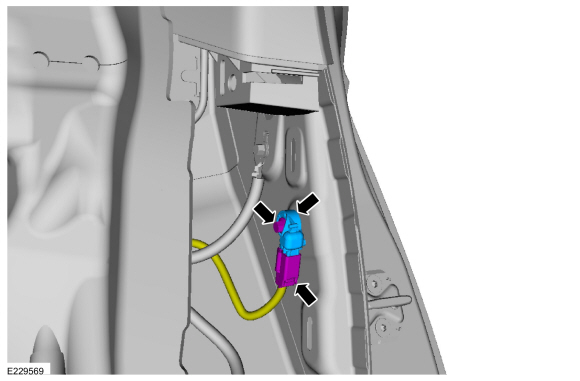
Disconnect the electrical connector, remove the bolt and the side impact sensor.
Torque: 93 lb.in (10.5 Nm)
 |
Installation
-
NOTE: Make sure the C-pillar and side impact sensor mating surfaces are clean and free of foreign material.
To install, reverse the removal procedure.
-
If the SRS was depowered, repower the SRS.
Refer to: Supplemental Restraint System (SRS) Depowering and Repowering (501-20B Supplemental Restraint System, General Procedures).
 Battery Energy Control Module B (BECMB). Removal and Installation
Removal
WARNING:
The following procedure prescribes critical repair steps
required for correct restraint system operation during a crash. Follow
all notes and steps carefully...
 Clockspring. Removal and Installation
Removal
NOTE:
Removal steps in this procedure may contain installation details.
WARNING:
Turn the ignition OFF and wait one minute to deplete
the backup power supply...
Other information:
Ford Fusion 2013–2020 Service Manual: Electronic Engine Controls - Overview. Description and Operation
Overview The EEC system provides optimum control of the engine through the enhanced capability of the powertrain control module (PCM). The EEC system also has an on board diagnostic (OBD) monitoring system with features and functions to meet federal regulations on exhaust emissions...
Ford Fusion 2013–2020 Owners Manual: Audio System
WARNING: Driving while distracted can result in loss of vehicle control, crash and injury. We strongly recommend that you use extreme caution when using any device that may take your focus off the road. Your primary responsibility is the safe operation of your vehicle...
Categories
- Manuals Home
- 2nd Generation Ford Fusion Owners Manual
- 2nd Generation Ford Fusion Service Manual
- Front Controls Interface Module (FCIM). Removal and Installation
- Engine - 1.5L EcoBoost (118kW/160PS) – I4
- Electrical
- New on site
- Most important about car
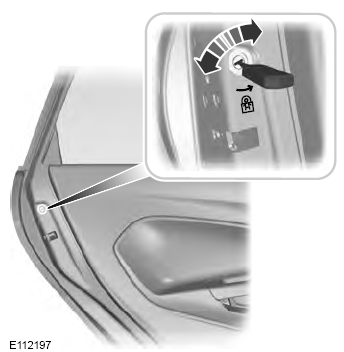
Child Safety Locks
When these locks are set, the rear doors cannot be opened from the inside.

Copyright © 2026 www.fofusion2.com