
Ford Fusion: Entertainment / Bluetooth Stereo or USB
Bluetooth Stereo and USB allow you to access media that you store on your Bluetooth device or USB device such as music, audio books or podcasts.
The following buttons are available for Bluetooth and USB:
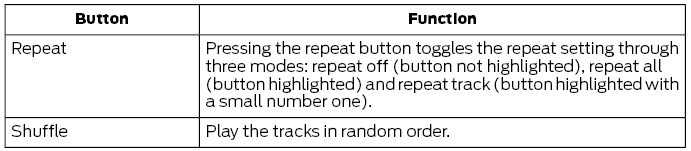
You can use the forward, reverse, pause or play buttons to control the audio playback.
To get more information about the currently playing track, press the cover art or Info button.
For some devices, SYNC 3 is able to provide 30-second skip buttons when you listen to audio books or podcasts. These buttons allow you to skip forward or backward within a track.
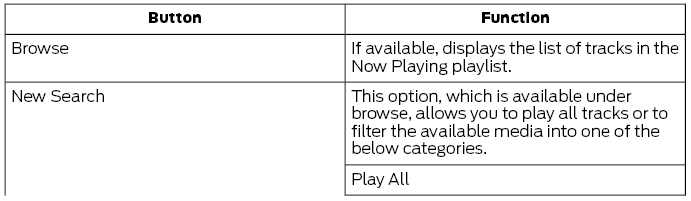
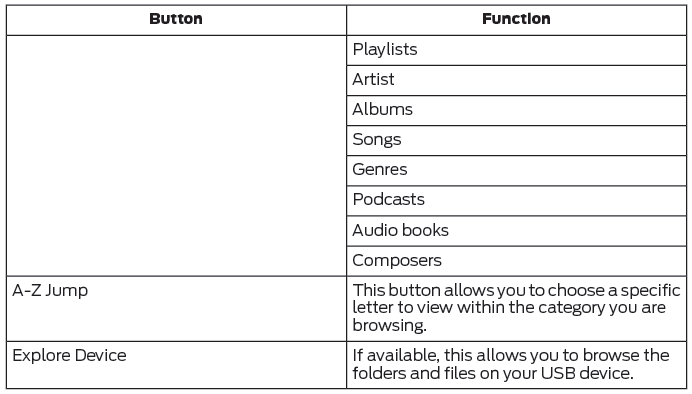
While playing audio from a USB device you can look for certain music by selecting the following:
 CD (If equipped)
Once you select this option, the system
returns you to the main audio screen.
The current audio information appears on
the screen.
The following buttons are also available:
You can use the forward, reverse, pause or
play buttons to control the audio playback...
 USB Ports. Apps. Supported Media Players, Formats and Metadata Information
USB Ports
The USB ports are in the center console or
behind a small access door in the
instrument panel.
This feature allows you to plug in USB
media devices, memory sticks, flash drives
or thumb drives, and charge devices if they
support this feature...
Other information:
Ford Fusion 2013–2020 Service Manual: Upper Arm. Removal and Installation
Special Tool(s) / General Equipment Vehicle/Axle Stands Removal NOTICE: Suspension fasteners are critical parts that affect the performance of vital components and systems. Failure of these fasteners may result in major service expense...
Ford Fusion 2013–2020 Owners Manual: All-Wheel Drive
All-wheel drive uses all four wheels to power the vehicle. This increases traction, enabling you to drive over terrain and road conditions that a conventional two-wheel drive vehicle cannot. The AWD system turns on when needed and does not require input from you...
Categories
- Manuals Home
- 2nd Generation Ford Fusion Owners Manual
- 2nd Generation Ford Fusion Service Manual
- Powertrain
- Engine - 1.5L EcoBoost (118kW/160PS) – I4
- Electrical
- New on site
- Most important about car
Direction Indicators. Interior Lamps
Direction Indicators
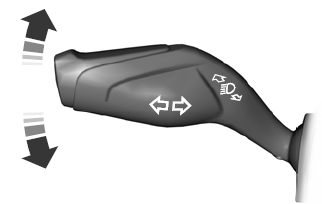
Push the lever up or down to use the direction indicators.

Copyright © 2026 www.fofusion2.com