
Ford Fusion: Personal Safety System™
The Personal Safety System provides an improved overall level of frontal crash protection to front seat occupants and is designed to help further reduce the risk of airbag-related injuries. The system is able to analyze different occupant conditions and crash severity before activating the appropriate safety devices to help better protect a range of occupants in a variety of frontal crash situations.
The Vehicle Personal Safety System consists of:
- Driver and passenger dual-stage airbag supplemental restraints.
- Front seat outermost seatbelts with pretensioners, energy management retractors and seatbelt usage sensors.
- Driver seat position sensor.
- Passenger seat position sensor.
- Front passenger sensing system.
- Passenger airbag off and on indicators.
- Front crash severity sensors.
- Restraints control module with impact and safing sensors.
- Restraint system warning lamp and tone.
- The electrical wiring for the airbags, crash sensors, seatbelt pretensioners, front seatbelt usage sensors, driver seat position sensor, front passenger sensing system and indicators.
How Does the Personal Safety System Work?
The Personal Safety System can adapt the deployment strategy of the safety devices according to crash severity and occupant conditions. A collection of crash and occupant sensors provides information to the restraints control module. During a crash, the restraints control module may deploy the seatbelt pretensioners, one or both stages of the dual-stage airbags based on crash severity and occupant conditions.
 Child Restraint and Seatbelt Maintenance. Seatbelt Extensions
Child Restraint and Seatbelt Maintenance
Inspect the vehicle seatbelts and child
safety seat systems periodically to make
sure they work properly and are not
damaged...

Other information:
Ford Fusion 2013–2020 Owners Manual: Exterior Mirrors
Power Exterior Mirrors WARNING: Do not adjust the mirrors when your vehicle is moving. This could result in the loss of control of your vehicle, serious personal injury or death. Left-hand mirror. Adjustment control. Right-hand mirror. To adjust a mirror: Select the mirror you want to adjust. The control will illuminate. Adjust the position of the mirror. Press the mirror switch aga..
Ford Fusion 2013–2020 Owners Manual: Hints on Controlling the Interior Climate - Vehicles With: Manual Temperature Control
General Hints Note:Prolonged use of recirculated air may cause the windows to fog up. Note: You may feel a small amount of air from the footwell air vents regardless of the air distribution setting. Note: To reduce humidity build-up inside your vehicle, do not drive with the system switched off or with recirculated air always switched on. Note: Do not place objects under the front seats as ..
Categories
- Manuals Home
- 2nd Generation Ford Fusion Owners Manual
- 2nd Generation Ford Fusion Service Manual
- Powertrain
- Cylinder Head Temperature (CHT) Sensor. Removal and Installation
- Main Control Valve Body. Removal and Installation
- New on site
- Most important about car
Cross Traffic Alert System Sensors
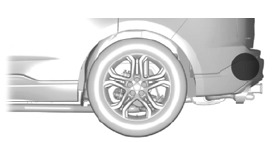
The sensors are behind the rear bumper on both sides of your vehicle.
