Ford Fusion: Information Displays / General Information
WARNING: Driving while distracted can result in loss of vehicle control, crash and injury. We strongly recommend that you use extreme caution when using any device that may take your focus off the road. Your primary responsibility is the safe operation of your vehicle. We recommend against the use of any hand-held device while driving and encourage the use of voice-operated systems when possible. Make sure you are aware of all applicable local laws that may affect the use of electronic devices while driving.
Note: Your vehicle may or may not be equipped with all the messages listed in this chapter. Your vehicle will not display messages of systems it is not equipped with.
Various systems on your vehicle can be controlled using the information display controls on the steering wheel. Corresponding information is displayed in the information display.

 Information Display Controls (Type 1 and Type 2)
Press the up or down arrow buttons to
scroll through the list.
Press the right arrow button to enter a
sub-menu.
Press the left arrow button to exit a
menu...
Other information:
Ford Fusion 2013–2020 Owners Manual: Reduced Engine Performance. Economical Driving
Reduced Engine Performance WARNING: If you continue to drive your vehicle when the engine is overheating, the engine could stop without warning. Failure to follow this instruction could result in the loss of control of your vehicle. If the engine coolant temperature gauge needle moves to the upper limit position, the engine is overheating...
Ford Fusion 2013–2020 Service Manual: Specifications
General Specifications Item Specification Plug Weld hole 8 mm (0.315 in) Weld Wire ER70S-3 0.9 mm (0.0354 in) - 1.1 mm (0.0433 in) Weld Wire ER70S-6 0...
Categories
- Manuals Home
- 2nd Generation Ford Fusion Owners Manual
- 2nd Generation Ford Fusion Service Manual
- Engine Cooling System Draining, Vacuum Filling and Bleeding. General Procedures
- Pre-Collision Assist (IF EQUIPPED)
- Transmission Fluid Drain and Refill. General Procedures
- New on site
- Most important about car
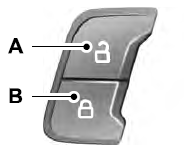
Power Door Locks
The power door lock control is on the driver and front passenger door panels.