
Ford Fusion: Climate Control System / Climate Control System - General Information
Ford Fusion 2013–2020 Service Manual / Electrical / Climate Control System / Climate Control System - General Information
- Air Conditioning (A/C) Compressor Inlet Line - 1.5L EcoBoost (118kW/160PS) – I4. Removal and Installation
- Air Conditioning (A/C) Compressor Outlet Line - 1.5L EcoBoost (118kW/160PS) – I4. Removal and Installation
- Air Conditioning (A/C) Pressure Transducer. Removal and Installation
- Air Distribution Door Actuator. Removal and Installation
- Air Inlet Door Actuator. Removal and Installation
- Ambient Air Temperature Sensor. Removal and Installation
 Refrigerant System Tests - 1.5L EcoBoost (118kW/160PS) – I4. General Procedures
Inspection
NOTE:
Procedure 1 — Ambient Temperature below 21 °C (70 °F).
NOTE:
Proper A/C system diagnosis on a vehicle’s
compressor is dependent on correct refrigerant system charge and tested
in ambient temperatures above 21°C (70°F)...
 Air Conditioning (A/C) Compressor Inlet Line - 1.5L EcoBoost (118kW/160PS) – I4. Removal and Installation
Removal
NOTICE:
During the removal or installation of components, cap, tape
or otherwise appropriately protect all openings and tubes/fittings to
prevent the ingress of dirt or other contamination...
Other information:
Ford Fusion 2013–2020 Service Manual: Pinpoint Test - DTC: A. Diagnosis and Testing
B0001:11, B0001:12, B0001:13 and B0001:1A Refer to Wiring Diagrams Cell 46 for schematic and connector information. Normal Operation and Fault Conditions The RCM continuously monitors the driver airbag stage 1 circuits for the following faults: Resistance out of range Unexpected voltage Short to ground Faulted driver airbag If a fault is detected, the RCM..
Ford Fusion 2013–2020 Service Manual: Evaporative Emissions - System Operation and Component Description. Description and Operation
System Operation Refer to the PC/ED manual section 1 Description and Operation. System Diagram Item Description 1 Valve cover 2 Turbocharger inlet pipe 3 Air cleaner (ACL) outlet pipe 4 Vapor ejector 5 Turbocharger to CAC (Charge Air Cooler) tube 6 Dual check valve 7 EVAP (Evaporative Emission) canister pur..
Categories
- Manuals Home
- 2nd Generation Ford Fusion Owners Manual
- 2nd Generation Ford Fusion Service Manual
- Memory Function
- Electronic Parking Brake (EPB) Service Mode Activation and Deactivation. General Procedures
- Automatic Transmission - 6-Speed Automatic Transmission – 6F35
- New on site
- Most important about car
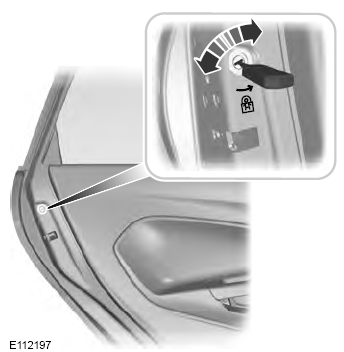
Child Safety Locks
When these locks are set, the rear doors cannot be opened from the inside.

Copyright © 2026 www.fofusion2.com