
Ford Fusion: Information and Entertainment System - General Information - Vehicles With: SYNC 3 / Active Noise Control Microphone. Removal and Installation
Ford Fusion 2013–2020 Service Manual / Electrical / Information and Entertainment Systems / Information and Entertainment System - General Information - Vehicles With: SYNC 3 / Active Noise Control Microphone. Removal and Installation
Removal
NOTE: Removal steps in this procedure may contain installation details.
-
Refer to: Health and Safety Precautions (100-00 General Information, Description and Operation). WARNING:
Before beginning any service procedure in this
section, refer to Safety Warnings in section 100-00 General Information.
Failure to follow this instruction may result in serious personal
injury.
WARNING:
Before beginning any service procedure in this
section, refer to Safety Warnings in section 100-00 General Information.
Failure to follow this instruction may result in serious personal
injury.
-
Lower the headliner.
Refer to: Headliner (501-05 Interior Trim and Ornamentation, Removal and Installation).
-
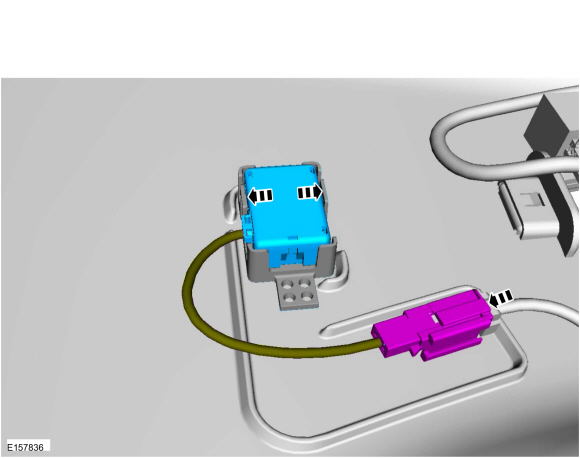
NOTE: Rear microphone shown, RH side and LH side microphones similar.
Release the tabs and remove the ANC microphone.
-
Disconnect the electrical connector.
-
Disconnect the electrical connector.
 |
Installation
-
To install, reverse the removal procedure.
 SYNC Module [APIM] Programming. General Procedures
Activation
WARNING:
Before beginning any service procedure in this
section, refer to Health and Safety Precautions in section 100-00
General Information...
 Audio Digital Signal Processing (DSP) Module. Removal and Installation
Removal
NOTE:
Removal steps in this procedure may contain installation details.
WARNING:
Before beginning any service procedure in this
section, refer to Safety Warnings in section 100-00 General Information...
Other information:
Ford Fusion 2013–2020 Service Manual: Pinpoint Test - DTC: O. Diagnosis and Testing
B00A0:09, B00A0:4A, B00A0:63, B00A0:64 and B00A0:68 Refer to Wiring Diagrams Cell 46 for schematic and connector information. Normal Operation and Fault Conditions The RCM is in constant communication with various control modules on the HS-CAN2...
Ford Fusion 2013–2020 Owners Manual: Wi-Fi Hotspot
Creating a Wi-Fi Hotspot You can create a Wi-Fi hotspot in your vehicle and allow devices to connect to it for access to the Internet. Press the button to enter the settings menu. Select Connectivity Features. Select Vehicle Hotspot.Note: The vehicle hotspot default setting is on...
Categories
- Manuals Home
- 2nd Generation Ford Fusion Owners Manual
- 2nd Generation Ford Fusion Service Manual
- Cylinder Head Temperature (CHT) Sensor. Removal and Installation
- Front Controls Interface Module (FCIM). Removal and Installation
- Electronic Parking Brake (EPB) Service Mode Activation and Deactivation. General Procedures
- New on site
- Most important about car
Power Door Locks
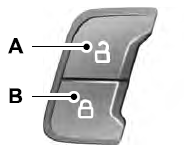
The power door lock control is on the driver and front passenger door panels.

Copyright © 2026 www.fofusion2.com