
Ford Fusion: Maintenance / Removing a Headlamp
Ford Fusion 2013–2020 Owners Manual / Maintenance / Removing a Headlamp
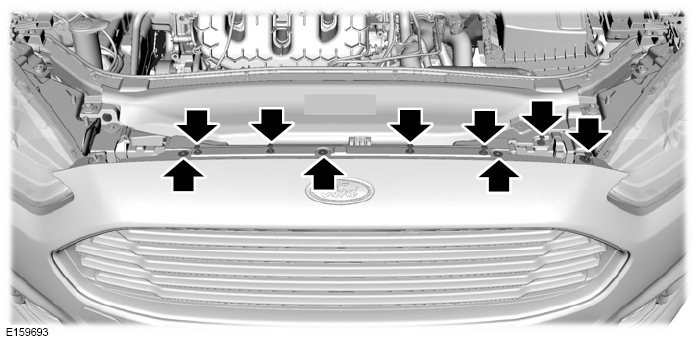
Note: To remove push pins, use a flat-bladed screwdriver to pull up the center release pin.
- Make sure the headlamp control is in the off position and open the hood.
- Remove the six push pins securing the front fascia to the front trim cover.
- Remove the three bumper cover upper screws using a flat-bladed screwdriver.
- Remove the push pin at the inboard
side of the headlamp you are servicing.
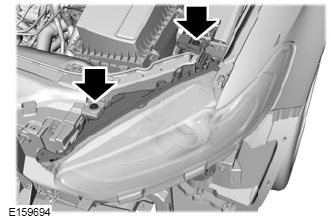
- Remove the two screws securing the
headlamp using a flat-bladed
screwdriver.
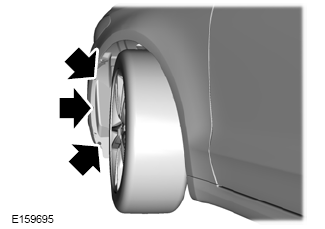
- Remove the lower three wheel housing
fasteners by turning them
counterclockwise.
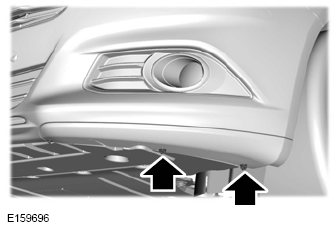
- Remove the two outmost front bumper
cover lower fasteners, only on the side
of the headlamp you are servicing, by
turning them counterclockwise.
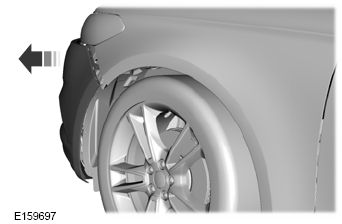
- Separate the front bumper cover from
the fender by gently pulling the front
bumper cover to the outside of the
vehicle 1.2 in (3 cm).
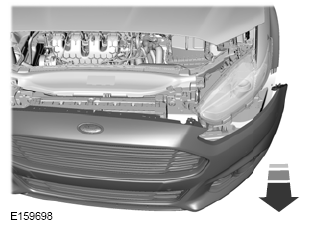
- From the front of the vehicle, gently
pull the front bumper cover forward
4 in (10 cm) by grasping it next to the
headlamp to be serviced and in the
lower front of the wheel opening.
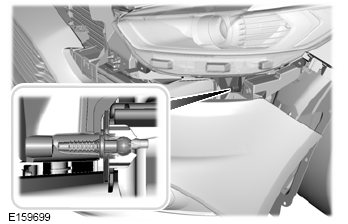
- Gently pull the headlamp assembly outward to disengage it from the lower fixing point.
- Carefully lift the headlamp and remove it from the vehicle.
- Disconnect the electrical connector from the headlamp assembly by pushing the release tab on the connector.
 Adjusting the Headlamps
Vertical Aim Adjustment
The headlamps on your vehicle are
properly aimed at the assembly plant. If
your vehicle has been in an accident, the
alignment of your headlamps should be
checked by your authorized dealer...
 Changing a Bulb
WARNING: Switch the lamps and
the ignition off. Failure to follow this
warning could result in serious personal
injury.
WARNING: Bulbs can become hot...
Other information:
Ford Fusion 2013–2020 Service Manual: Specifications
Torque Specifications Item Nm lb-ft lb-in ACM bolts 2.5 - 22 Antenna bolt 7 - 62 APIM screws 1 - 9 DACMC bolts 6 - 53 DSP bolts 6 - 53 FCIM bolts 2...
Ford Fusion 2013–2020 Service Manual: Parking Aid Camera - 4-Door. Removal and Installation
Removal NOTE: Removal steps in this procedure may contain installation details. WARNING: Before beginning any service procedure in this section, refer to Safety Warnings in section 100-00 General Information. Failure to follow this instruction may result in serious personal injury...
Categories
- Manuals Home
- 2nd Generation Ford Fusion Owners Manual
- 2nd Generation Ford Fusion Service Manual
- Starter Motor. Removal and Installation
- Automatic Transmission Fluid Check - 1.5L EcoBoost™/2.0L EcoBoost™/2.5L. Automatic Transmission Fluid Check - 2.7L EcoBoost™
- Main Control Valve Body. Removal and Installation
- New on site
- Most important about car
Direction Indicators. Interior Lamps
Direction Indicators
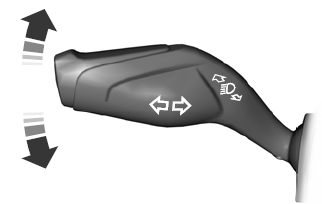
Push the lever up or down to use the direction indicators.

Copyright © 2026 www.fofusion2.com