
Ford Fusion: Anti-Lock Brake System (ABS) and Stability Control / Hydraulic Control Unit (HCU). Removal and Installation
Removal
NOTE: Removal steps in this procedure may contain installation details.
NOTE: The HCU and ABS module are released individually. A new HCU does not come equipped with an ABS module.
All vehicles
-
Remove the battery tray.
Refer to: Battery Tray (414-01 Battery, Mounting and Cables, Removal and Installation).
Vehicles with manual transmission
-
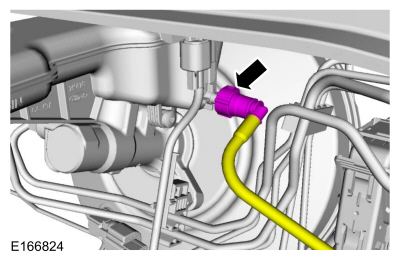
Disconnect the clutch master cylinder supply tube fitting.
 |
All vehicles
-
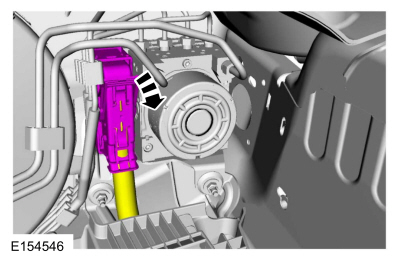
Disconnect the ABS module electrical connector.
 |
-
NOTICE: Make sure that all openings are sealed.
NOTICE: If the fluid is spilled on the paintwork, the affected area must be immediately washed down with cold water.
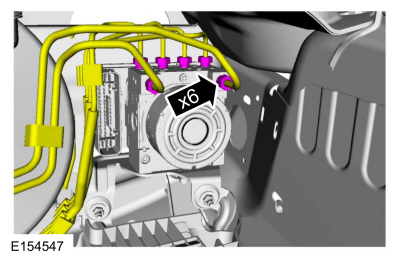
Disconnect the brake tube fittings.
Torque: 159 lb.in (18 Nm)
 |
-
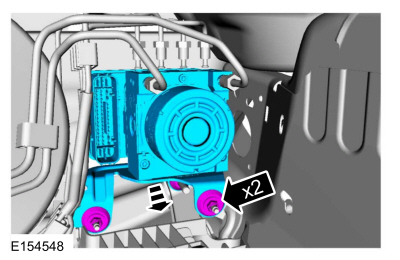
Remove the nuts and the HCU.
Torque: 80 lb.in (9 Nm)
 |
-
Remove the bolts and the HCU bracket.
Torque: 80 lb.in (9 Nm)
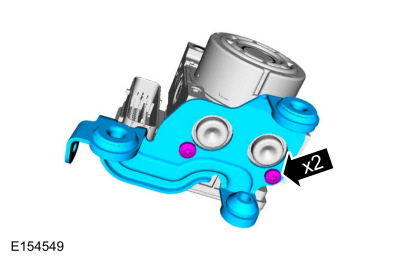 |
-
NOTICE: Make sure the HCU and ABS module are clean and free of brake fluid or foreign material before separating the components. Do not allow any brake fluid or foreign material to enter the mating side of the ABS module or component damage can occur.
Remove the screws and the ABS module. Discard the screws.
Torque: 49 lb.in (5.5 Nm)
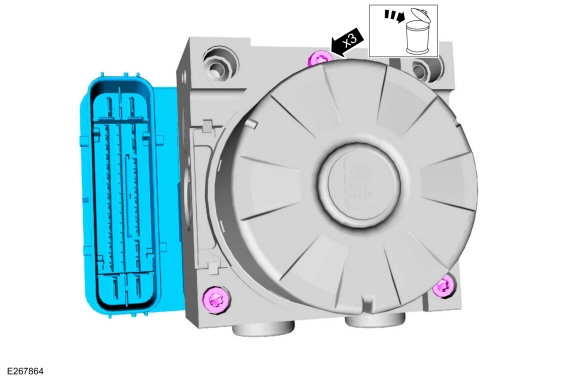 |
Installation
All vehicles
-
To install, reverse the removal procedure.
-
Bleed the brake system.
Refer to: Brake System Pressure Bleeding (206-00 Brake System - General Information, General Procedures).
-
If a new HCU
is being installed, carryout the IVD Initialization Sequence and Valve
Calibration using the scan tool and following the scan tool on-screen
instructions.
Vehicles with manual transmission
-
Bleed the clutch system.
 Front Wheel Speed Sensor. Removal and Installation
Removal
NOTE:
Removal steps in this procedure may contain installation details.
Remove the wheel and tire.
Refer to: Wheel and Tire (204-04A Wheels and Tires, Removal and Installation)...
 Rear Wheel Speed Sensor. Removal and Installation
Removal
NOTE:
Removal steps in this procedure may contain installation details.
All vehicles
With the vehicle in NEUTRAL, position it on a hoist...
Other information:
Ford Fusion 2013–2020 Owners Manual: Interior Luggage Compartment Release
WARNING: Keep vehicle doors and luggage compartment locked and keep keys and remote transmitters out of a child’s reach. Unsupervised children could lock themselves in the trunk and risk injury. Children should be taught not to play in vehicles...
Ford Fusion 2013–2020 Service Manual: Evaporator Core Leak Check - Vehicles With: R1234YF Refrigerant. General Procedures
Special Tool(s) / General Equipment Air Conditioning Service Unit Air Conditioning Adaptor Kit Inspection Recover the refrigerant. Refer to Air Conditioning (A/C) System Recovery, Evacuation and Charging procedure in Group 412...
Categories
- Manuals Home
- 2nd Generation Ford Fusion Owners Manual
- 2nd Generation Ford Fusion Service Manual
- Engine Cooling System Draining, Vacuum Filling and Bleeding. General Procedures
- Load Carrying
- Engine - 1.5L EcoBoost (118kW/160PS) – I4
- New on site
- Most important about car
Direction Indicators. Interior Lamps
Direction Indicators
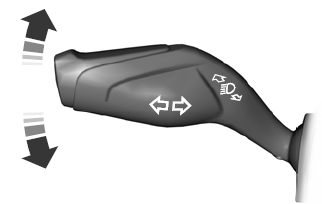
Push the lever up or down to use the direction indicators.
