
Ford Fusion: Audio System / Audio Unit - Vehicles With: Sony Audio System/Touchscreen Display
WARNING: Driving while distracted can result in loss of vehicle control, crash and injury. We strongly recommend that you use extreme caution when using any device that may take your focus off the road. Your primary responsibility is the safe operation of your vehicle. We recommend against the use of any hand-held device while driving and encourage the use of voice-operated systems when possible. Make sure you are aware of all applicable local laws that may affect the use of electronic devices while driving.
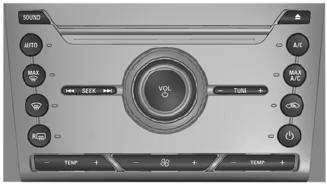
Note: Depending on your vehicle option package, the controls may look different from what you see here.
Note: Some features, such as satellite radio, may not be available in your location. Check with an authorized dealer.
Note: The touchscreen system controls most of the audio features.
Accessing the Sound Settings
 Press and release the button to
access settings for Treble,
Midrange, Bass, Fade and
Balance.
Press and release the button to
access settings for Treble,
Midrange, Bass, Fade and
Balance.
Adjusting the Volume
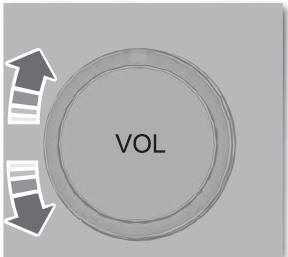
Turn to adjust the volume.
Changing Radio Stations

In radio mode, press and release + or - to search through the radio frequency band.
In satellite radio mode, press and release + or - to find the previous or next available satellite radio station.
Ejecting the CD
 Press and release the button to
eject a CD.
Press and release the button to
eject a CD.
Inserting a CD
Insert a CD into the CD slot.
Switching the Audio Unit On and Off
 Press and release the button.
Using Seek, Fast Forward and Reverse

n radio mode, select a frequency band and press and release either button. The system stops at the first station it finds in that direction.
In CD mode, press and release to select the next or previous track. Press and hold to move quickly forward or backward through the current track.
In satellite radio mode, press and release to select the next or previous satellite radio station. If you select a specific category, such as jazz, rock or news, press to find the next or previous station in that category.
 Audio Unit - Vehicles With: SYNC
WARNING: Driving while distracted
can result in loss of vehicle control, crash
and injury. We strongly recommend that
you use extreme caution when using any
device that may take your focus off the
road...
 Digital Radio (IF EQUIPPED)
Note: HD Radio broadcasts are not
available in all markets.
HD Radio technology is the digital
evolution of analog AM/FM radio. Your
system has a special receiver that allows
it to receive digital broadcasts, where
available, in addition to the analog
broadcasts, it already receives...
Other information:
Ford Fusion 2013–2020 Service Manual: Vehicle Dynamics Control Module (VDM). Removal and Installation
Removal NOTICE: Electronic modules are sensitive to static electrical charges. If exposed to these charges, damage may result. NOTE: Removal steps in this procedure may contain installation details. NOTE: The PMI process must begin with the current VDM installed...
Ford Fusion 2013–2020 Service Manual: Condenser Outlet Line - 1.5L EcoBoost (118kW/160PS) – I4. Removal and Installation
Removal NOTICE: During the removal or installation of components, cap, tape or otherwise appropriately protect all openings and tubes/fittings to prevent the ingress of dirt or other contamination. Remove caps, tape and other protective materials prior to installation...
Categories
- Manuals Home
- 2nd Generation Ford Fusion Owners Manual
- 2nd Generation Ford Fusion Service Manual
- Intake Manifold. Removal and Installation
- Transmission Fluid Drain and Refill. General Procedures
- Automatic Transmission Fluid Check - 1.5L EcoBoost™/2.0L EcoBoost™/2.5L. Automatic Transmission Fluid Check - 2.7L EcoBoost™
- New on site
- Most important about car
Understanding Your Tire Pressure Monitoring System
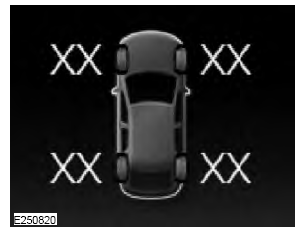
The tire pressure monitoring system measures pressure in your road tires and sends the tire pressure readings to your vehicle. You can view the tire pressure readings through the information display. The low tire pressure warning light will turn on if the tire pressure is significantly low. Once the light is illuminated, your tires are under-inflated and need to be inflated to the manufacturer’s recommended tire pressure. Even if the light turns on and a short time later turns off, your tire pressure still needs to be checked.
