
Ford Fusion: Using Adaptive Cruise Control (IF EQUIPPED) / Switching Adaptive Cruise Control On. Setting the Adaptive Cruise Speed. Setting the Adaptive Cruise Speed When Your Vehicle is Stationary
Switching Adaptive Cruise Control On
 For vehicles without Speed
Limiter, press and release the
button.
For vehicles without Speed
Limiter, press and release the
button.
 For vehicles with Speed Limiter,
press and release the button.
For vehicles with Speed Limiter,
press and release the button.
The indicator, current gap setting and set speed appear in the information display.
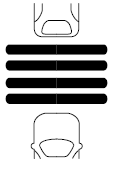
Setting the Adaptive Cruise Speed
Drive to your preferred speed.
 Press and release the button.
Take your foot off the accelerator pedal.
The indicator, current gap setting and set speed appear in the information display.
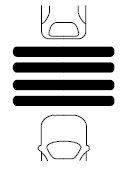
A vehicle graphic illuminates if there is a vehicle detected in front of you.
Note: When adaptive cruise control is active, the speedometer may vary slightly from the set speed displayed in the information display.
Setting the Adaptive Cruise Speed When Your Vehicle is Stationary
Follow a vehicle to a complete stop.
 Press while keeping the brake
pedal fully pressed.
Press while keeping the brake
pedal fully pressed.
The set speed adjusts to 20 mph (30 km/h).
The indicator, current gap setting and set speed appear in the information display.
 Using Adaptive Cruise Control (IF EQUIPPED)
WARNING: Pay close attention to
changing road conditions such as
entering or leaving a highway, on roads
with intersections or roundabouts, roads
without visible lanes of travel, roads that
are winding, slippery, unpaved, or steep
slopes...
 Following a Vehicle. Following a Vehicle to a Complete Stop
Following a Vehicle
WARNING: When following a
vehicle that is braking, your vehicle does
not always decelerate quickly enough to
avoid a crash without driver intervention...
Other information:
Ford Fusion 2013–2020 Service Manual: Accessory Drive - Component Location. Description and Operation
Early Build Vehicles Item Description 1 Accessory drive belt tensioner 2 Water pump pulley 3 Crankshaft belt pulley 4 Pulley - A/C compressor 5 Drive belt idler pulley assembly 6 Generator pulley 7 Accessory drive belt Late Build Vehicles Item Description 1 Coolant pump pulley 2 Generator...
Ford Fusion 2013–2020 Service Manual: Back Panel and Reinforcement. Removal and Installation
Special Tool(s) / General Equipment Hot Air Gun 8 mm Drill Bit MIG/MAG Welding Equipment Spot Weld Drill Bit Locking Pliers Materials Name Specification Metal Bonding AdhesiveTA-1, TA-1-B, 3M™ 08115, LORD Fusor® 108B - Seam SealerTA-2-B, 3M™ 08308, LORD Fusor® 803DTM - Removal WARNING: Before beginning any se..
Categories
- Manuals Home
- 2nd Generation Ford Fusion Owners Manual
- 2nd Generation Ford Fusion Service Manual
- Intake Manifold. Removal and Installation
- Garage Door Opener
- Pre-Collision Assist (IF EQUIPPED)
- New on site
- Most important about car
Fuel Quality
Choosing the Right Fuel
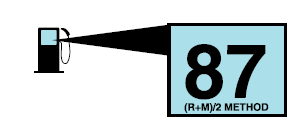
Your vehicle is designed to operate on regular unleaded gasoline with a minimum pump (R+M)/2 octane rating of 87.
